

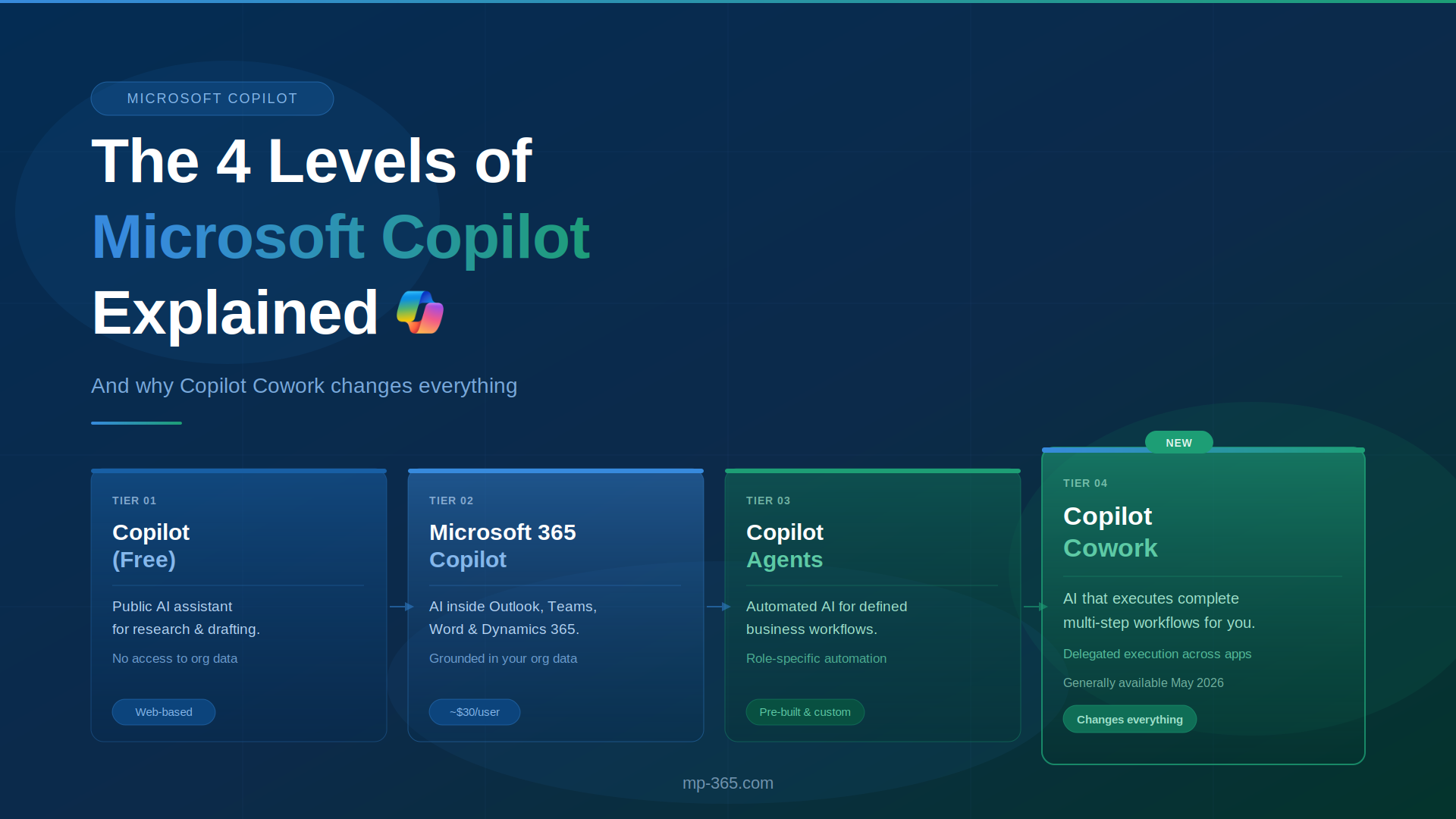
In this article, we explain the difference between Copilot, Microsoft 365 Copilot, Copilot Agents, and Copilot Cowork. You’ll learn how each tier works, what level of automation it offers, and how they integrate with Dynamics 365 workflows.
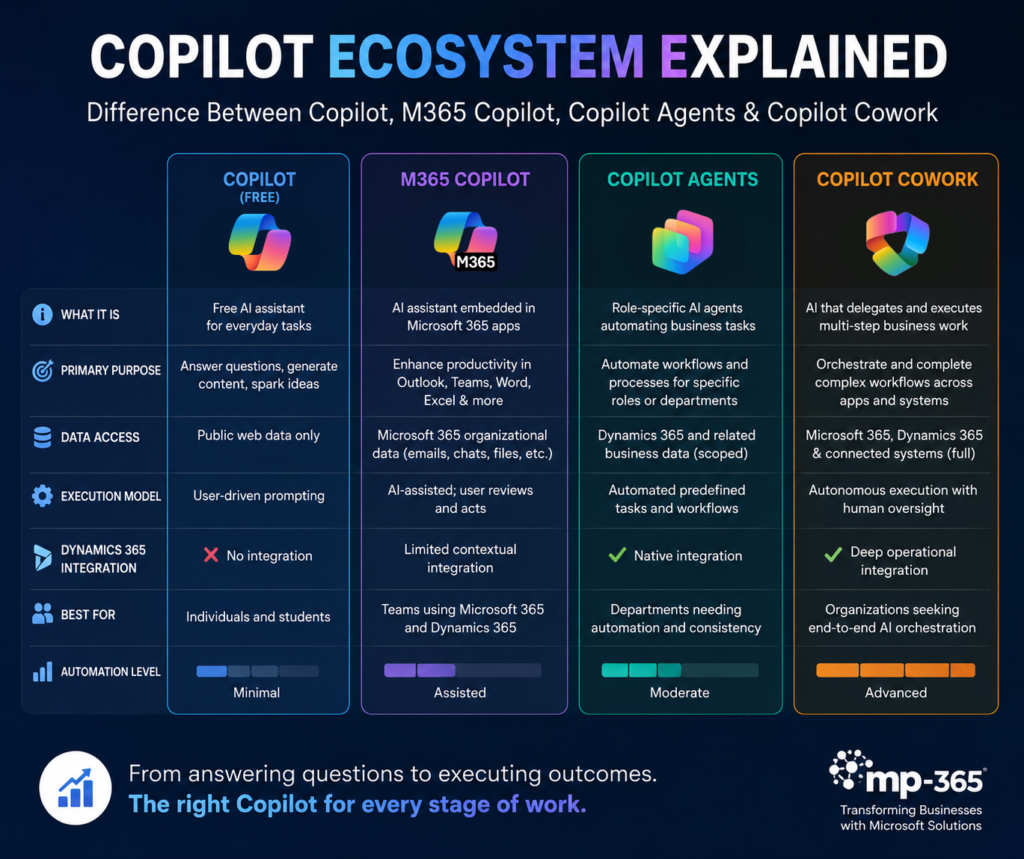
Copilot, MS Copilot, Copilot Agents, and Copilot Cowork explained, they are four distinct AI experiences built on the same Microsoft platform each designed for a different level of work, user need, and automation capability.
The confusion exists because Microsoft expanded the Copilot ecosystem rapidly, layering new AI capabilities into Dynamics 365, Microsoft 365, Teams, and business workflows faster than most organizations could keep up with the naming changes. As a result, many businesses now use multiple Copilot products simultaneously without fully understanding where one ends and another begins.
In this article, we’ll break down each tier clearly, explain the difference between Copilot, Microsoft 365 Copilot, and explore how agentic AI in Dynamics 365 is evolving into delegated workflows through Copilot Cowork. The biggest shift isn’t just better AI assistance, it’s AI beginning to execute real work across your business environment.
Copilot (Free): The Public AI Assistant
Copilot (Free) is Microsoft’s publicly available AI assistant designed for general productivity, research, and content creation using web-based information.
What It Does:
- Answers questions using public web data
- Drafts emails, summaries, and basic written content
- Generates images and creative ideas from prompts
- Helps with brainstorming, research, and planning
- Assists with basic productivity tasks through conversational chat
What It Cannot Do:
- Cannot access Dynamics 365 records or CRM data
- Cannot use your organization’s internal Microsoft 365 data securely
- Cannot execute workflows or automate business processes across apps
Example:
A sales rep could use Copilot (free) to draft a cold outreach email for a manufacturing prospect. However, the AI would have no visibility into the actual opportunity record, previous customer conversations, pipeline stage, or account activity stored inside Dynamics 365 Sales.
The moment businesses need AI grounded in their real organizational data, they move into the next tier: Microsoft 365 Copilot.
Microsoft 365 Copilot: AI Inside Your Work Apps
Microsoft 365 Copilot is a paid AI layer that works inside Microsoft applications and uses your organization’s Dynamics 365 data to assist with daily work tasks.
What It Does
- Summarizes Teams meetings and extracts action items
- Drafts Outlook emails using organizational context and previous conversations
- Assists with document creation in Word, Excel, and PowerPoint
- Searches SharePoint files and Microsoft Graph data conversationally
- Surfaces relevant Dynamics 365 information during workflows and meetings
Licensing
- Typically licensed at approximately $30/user/month for enterprise plans
- Microsoft also introduced lower-cost business licensing options around $21/user/month for qualifying Business SKUs
- Requires an existing Microsoft 365 subscription
What It Cannot Do
- Still relies on turn-by-turn user prompting
- Cannot autonomously complete complex multi-step workflows
- Requires the user to manually review, trigger, and execute actions
Dynamics 365 Example:
Microsoft 365 Copilot can summarize the discussion of a sales call held in teams, identify follow-up tasks, and draft a customer recap email using meeting context and CRM information. However, the sales rep still needs to review the content, send the email manually, and manage the remaining workflow steps themselves.
As organizations move beyond AI assistance and into workflow automation, Microsoft introduces the next layer: Copilot Agents.
Copilot Agents: Automated AI for Specific Roles
Copilot Agents are purpose-built AI assistants designed to automate defined business workflows for specific departments, roles, or operational processes.
Two Types of Copilot Agents
Pre-built Agents:
Microsoft provides ready-made agents for roles such as Sales, Customer Service, and Finance. These agents are natively connected to Dynamics 365 data and are designed for common operational workflows.
Custom Agents:
Organizations can build their own agents using Copilot Studio or Agent Builder, either internally or with help from a Microsoft Solutions Partner. These agents can be tailored to specific workflows, approval processes, reporting structures, or business rules.
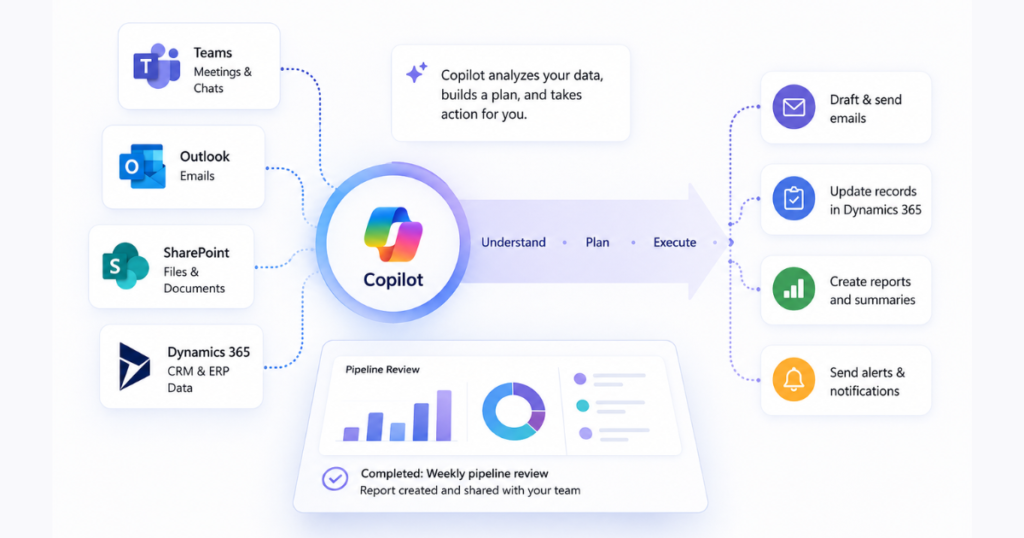
What Agents Can Do in Dynamics 365
- Monitor pipeline activity and opportunity movement
- Identify stalled or inactive deals automatically
- Send alerts and recommendations through Microsoft Teams
- Deliver recurring reports and workflow updates on a schedule
What Agents Cannot Do
- Agents are narrow and pre-scoped by design
- They focus on defined tasks rather than open-ended work
- They do not manage broad, cross-app, multi-step workflows the way Copilot Cowork does
Dynamics 365 Sales Example
A custom Copilot Agent can monitor Dynamics 365 Sales for opportunities that have not progressed in more than 14 days. Every morning, the agent sends a Teams notification to the assigned sales rep, highlights the stalled opportunity, and recommends a suggested next action based on previous customer activity.
Agents automate what’s defined. Copilot Cowork handles what’s complex.
Looking to automate Dynamics 365 workflows with Copilot Agents and AI-driven processes? Modern Partners 365 helps businesses implement Microsoft Copilot solutions that connect sales and operations into smarter automated workflows.
Copilot Cowork: The AI That Does the Work for You
Copilot Cowork is Microsoft’s newest AI work layer, designed to execute complete business tasks across applications instead of simply assisting users step by step. Officially becoming generally available in May 2026, Cowork represents the biggest evolution in Microsoft’s AI ecosystem since the original launch of Copilot.
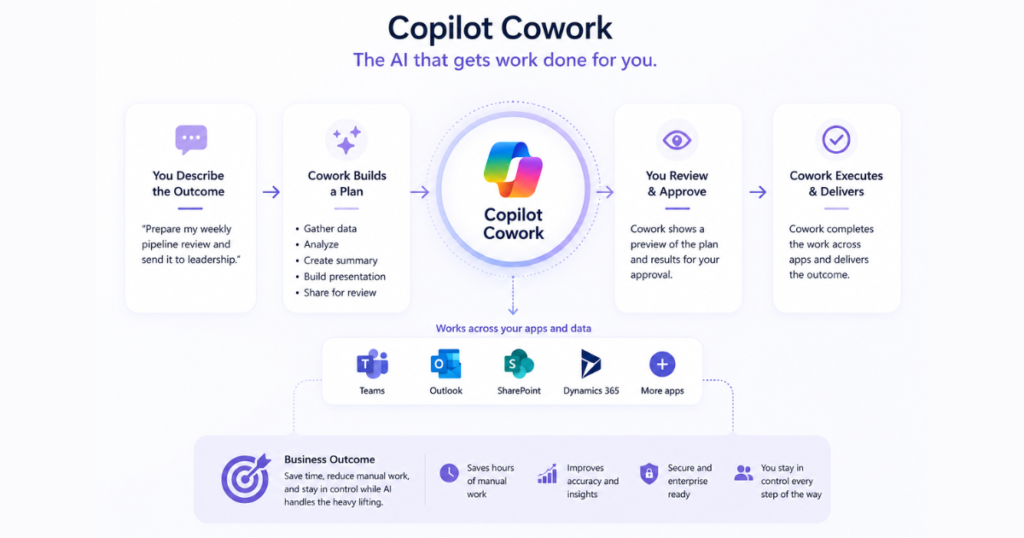
Previous Copilot tiers focused on helping users work faster inside Dynamics 365, but Cowork shifts the model toward delegated execution — where users describe the outcome they want, and Cowork coordinates the workflow on their behalf.
How Cowork Works
- You describe the desired outcome in natural language
- Cowork builds a multi-step execution plan grounded in Work IQ
- It analyzes emails, Teams meetings, SharePoint files, and Dynamics 365 data for context
- It executes actions step by step across connected applications
- Before sensitive actions like sending emails or updating records, it presents a preview for approval
- Users delegate workflows without losing visibility or control
What’s Included in Cowork (as of May 2026)
- Mobile support for iOS and Android, allowing task delegation away from the desk
- Cowork Skills for reusable workflow instructions and repeatable business processes
- Native Dynamics 365 integration for pipeline reviews, case management, approvals, and ERP workflows
- Third-party integrations with platforms like monday.com, Miro, LSEG, and S&P Global Energy
- Custom connectors and workflow extensions through Copilot Studio
Copilot Cowork in Dynamics 365: Why This Matters
For organizations already operating on Dynamics 365 Sales, Customer Service, or ERP, Copilot Cowork becomes significantly more powerful because it doesn’t just surface CRM information it acts on it. This is where agentic AI in Dynamics 365 moves beyond assistance and into delegated execution, connecting Microsoft 365 collaboration data with operational workflows across the business.
Example
A sales manager can ask Cowork in Dynamics 365 to prepare the weekly pipeline review for leadership. Cowork pulls open opportunities from Dynamics 365 Sales, cross-references recent Teams conversations and customer emails, identifies at-risk deals, and automatically builds a formatted PowerPoint presentation summarizing the pipeline status and priorities.
Copilot vs M365 Copilot vs Copilot Agents vs Copilot Cowork: Side-by-Side
While all four Copilot tiers are built on Microsoft’s AI ecosystem, they differ significantly in how they access data, automate workflows, and integrate with Dynamics 365. Understanding the difference between Copilot and Copilot for Microsoft 365 along with the Microsoft Copilot Cowork vs Copilot agents distinction is essential for organizations planning their long-term AI automation strategy.
The table below makes it easier to identify which Copilot tier fits your current business needs before moving into a broader automation strategy.
| Feature | Microsoft Copilot (Free) | Microsoft 365 Copilot | Copilot Agents | Copilot Cowork |
| Primary Purpose | General AI assistant for public tasks | AI assistance inside work applications | Automated role-specific workflows | Delegated multi-step business execution |
| Data Access | Public web data only | Microsoft 365 organizational data | Dynamics 365 role-specific data | Full M365, Dynamics 365, and connected third-party systems |
| Dynamics 365 Integration | ❌ No integration | ⚠️ Limited contextual integration | ✅ Native integration | ✅ Deep operational integration |
| Execution Model | User-driven prompting | AI-assisted productivity | Automated predefined tasks | Autonomous multi-step delegated workflows |
| User Control | Fully manual | User reviews and executes actions | Scoped automation rules | Approval-based delegated execution |
| Workflow Complexity | Simple personal tasks | Daily productivity tasks | Narrow operational workflows | Complex cross-app workflows |
| Typical Use Cases | Research, drafting, brainstorming | Meeting summaries, email drafting, document assistance | Pipeline monitoring, alerts, scheduled reporting | Pipeline reviews, follow-ups, approvals, report generation |
| Automation Level | Minimal | Assisted | Moderate | Advanced |
| Cross-App Coordination | ❌ None | ⚠️ Limited | ⚠️ Limited to scoped workflows | ✅ Extensive |
| Third-Party Integrations | ❌ None | ⚠️ Limited | ⚠️ Possible via custom setup | ✅ Native and connector-based integrations |
| Best For | Individual users | Teams Using Microsoft 365 and Dynamics 365 | Departments needing process automation | Organizations pursuing enterprise AI orchestration |
| Key Limitation | No business data access | Requires user-driven execution | Narrow and pre-scoped | Requires Microsoft 365 Copilot foundation |
| Licensing | Free | Paid add-on license | Included with applicable Copilot/Dynamics workloads | Included with Microsoft 365 Copilot (GA May 2026) |
Which Copilot Is Right for You?
The right Copilot depends on how much automation, organizational context, and workflow execution your business actually needs inside Dynamics 365.
Decision Guide
- If you want a free AI assistant for research, drafting, and personal productivity tasks → Copilot (Free)
- If your team needs AI embedded directly into Outlook, Teams, Word, Excel, and Dynamics 365 workflows → Microsoft 365 Copilot
- If you need automated, role-specific workflows tied to Dynamics 365 processes → Copilot Agents
- If you want to delegate complex, multi-step work across apps, meetings, files, and business systems → Copilot Cowork
Can You Use More Than One Copilot?
Yes, these Copilot tiers are not mutually exclusive. Most organizations using Dynamics 365 will operate across multiple layers at the same time, depending on the workflow and department needs.
Microsoft 365 Copilot may assist employees during daily work, Copilot Agents may automate specific operational processes, and Copilot Cowork can orchestrate larger cross-functional workflows that span the entire business environment.
Conclusion: Copilot Ecosystem Is Bigger Than You Think
The confusion around Microsoft Copilot naming exists because Microsoft didn’t create a single AI product, it created multiple layers of AI designed for different levels of productivity, automation, and business execution. From the free public assistant to Microsoft 365 Copilot, Copilot Agents, and finally Copilot Cowork, each tier represents a major step forward in how organizations interact with AI in Dynamics 365.
The biggest shift is happening with Copilot Cowork explained through delegated workflows and agentic AI Dynamics 365 capabilities. Businesses are moving beyond simple prompting and into AI systems that can coordinate actions, execute workflows, and deliver completed outcomes across apps and business data.
What to Do Next
- Read the full Copilot Cowork explained: What is Copilot Cowork
- Explore how Dynamics 365 integrates with Copilot: Copilot in Dynamics 365
- Contact Modern Partners 365 for a Copilot readiness assessment
As Microsoft continues expanding the Copilot ecosystem, organizations that understand how these layers work together will be in the strongest position to scale AI successfully across Dynamics 365 and the broader enterprise environment.