

In this guide, we will explore what Copilot Cowork is, how it works, where to access it, and how businesses can start using it effectively.
Microsoft users have already seen how Microsoft 365 Copilot can draft emails, summarize meetings, and answer questions in seconds. But for many teams, the real challenge starts after the summary is generated. The follow-up tasks, reporting, coordination, and repetitive admin work still need to be done manually.
That is where Copilot Cowork changes the experience. Instead of acting like an assistant that simply responds to prompts, Copilot Cowork is designed to help complete real work across your Microsoft 365 environment. It moves beyond chat-based help and into action-based execution, giving organizations a new way to delegate repetitive work inside of Microsoft 365.
What Is Copilot Cowork?
Copilot Cowork is an AI-powered workflow experience inside Microsoft 365 that helps users delegate and execute multi-step tasks across their apps instead of only generating responses in AI chat.
Unlike traditional Copilot, which reacts to prompts one request at a time, Copilot Cowork uses Microsoft 365 agentic AI capabilities to plan actions, coordinate workflows, and complete structured business processes on the user’s behalf.
A simple way to think about it is the difference between asking a colleague for quick advice versus assigning them responsibility for completing an entire project task.
Powered by Microsoft’s evolving Work IQ capabilities, Copilot Cowork helps organizations move from AI assistance to AI-driven execution inside Microsoft 365.

How Copilot Cowork Actually Works?
Copilot Cowork is designed to handle multi-step workflows in a way that feels natural for everyday Microsoft 365 users. Instead of jumping between apps and manually coordinating tasks, users define the result they want and Cowork handles the process behind the scenes.
- You describe the outcome you want completed
- Cowork creates a step-by-step execution plan
- It works across Microsoft 365 apps with visible progress updates
- It asks for approval before completing sensitive actions
The user always remains in control throughout the process. Copilot Cowork does not perform irreversible actions silently or independently. Before anything sensitive is finalized, the system checks back with the user for confirmation, helping organizations delegate tasks inside Microsoft Copilot without losing visibility or governance.
How to Access Copilot Cowork in Microsoft 365?
Copilot Cowork is built directly into the Microsoft 365 Copilot rather than existing as a separate application. Users with eligible Microsoft 365 Copilot access can use Cowork from the same environment they already use for chat, content generation, and workflow support.
- Go to microsoft365.com and sign in with your Microsoft 365 account
- Open Microsoft 365 Copilot from the app launcher or navigation menu
- Look for the Cowork (Frontier) alongside standard Copilot Chat
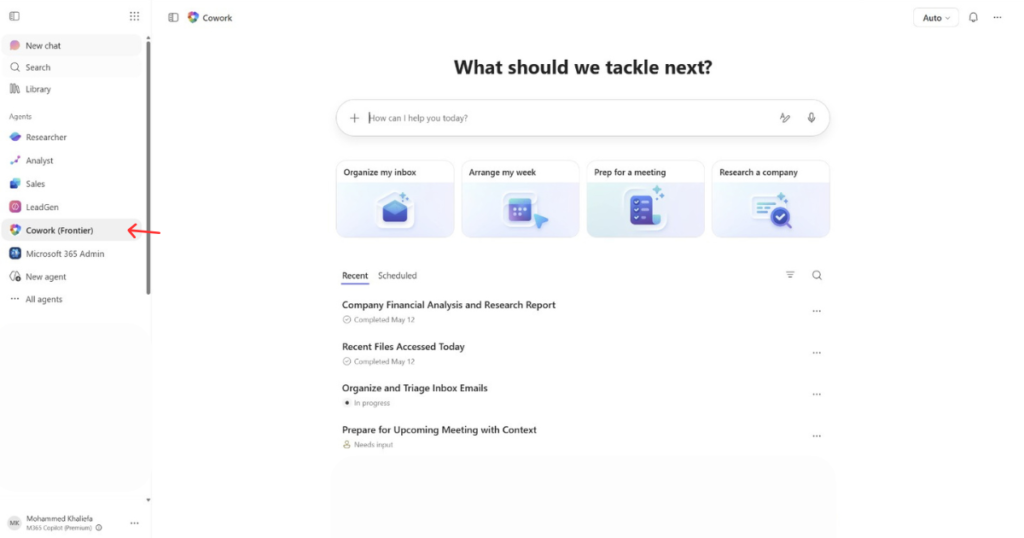
If you do not see it yet, your organization may need to enroll in the Microsoft Frontier program. A Microsoft partner such as Modern Partners 365 can help assess eligibility and guide deployment.
Real Use Cases: What You Can Delegate Today
Copilot Cowork becomes most valuable when applied to repetitive business processes that consume time every day and every week. Tasks that follow a predictable structure are ideal for Microsoft 365 workflow automation.
Meeting Preparation
You can ask Copilot Cowork to prepare a briefing package for an upcoming client meeting using emails, Teams conversations, calendar activity, and related files. It delivers a structured summary document with action items, discussion points, and supporting context already organized.
Inbox Management
You can instruct Cowork to group related email threads, identify priorities, and draft responses for review. It delivers categorized inbox recommendations and ready-to-send reply drafts that reduce manual email handling.
Weekly Reporting
You can ask Copilot Cowork for a weekly performance report that pulls data from shared files, summarizes updates, builds charts, and prepares a Teams post. It delivers a completed report workflow from a single instruction instead of requiring multiple disconnected tasks.
Document Assembly
You can ask Copilot Cowork to combine multiple source files into a structured first draft stored in SharePoint. It delivers organized documentation with consistent formatting and reusable content already assembled.

Copilot Cowork Skills: Your Team’s Secret Weapon
Copilot Cowork Skills allow organizations to standardize how important workflows are completed inside Microsoft 365. A Skill is essentially a reusable set of instructions that defines how a task should be handled, including formatting preferences, approved data sources, tone of voice, and expected outputs.
Instead of every employee manually recreating the same process from scratch, Skills help teams lock in consistency so Cowork follows the same structure every time. This creates repeatable Microsoft 365 Copilot automation workflows that scale across departments without increasing manual effort.
A sales team, for example, could create a “Sales Opportunity Summary” Skill that automatically gathers CRM updates from Dynamics 365, recent client emails from Outlook, and meeting notes from Teams, then formats everything into a standardized pipeline report for management review.
Sales representatives could generate accurate opportunity summaries in seconds without manually collecting information from multiple systems, making reusable AI workflows inside Microsoft much easier to manage.
Security, Governance & Staying in Control
One of the biggest questions organizations ask about Copilot Cowork is whether AI can safely act on behalf of employees. Microsoft designed Cowork to operate within the permissions of the signed-in user, which means it cannot access files, conversations, or data the user themselves cannot access.
Documents and outputs remain stored within trusted Microsoft 365 services such as SharePoint and OneDrive, helping organizations maintain familiar governance practices while expanding AI capabilities.
- Agent 365 gives IT teams a centralized control plane to govern, monitor, and secure AI agents
- Microsoft Purview policies, sensitivity labels, and DLP protections are automatically enforced
- Every Copilot Cowork action is logged, traceable, and auditable for enterprise compliance
Conclusion: Ready to Hand off Your First Task?
Copilot Cowork represents a major shift in how organizations use AI inside Microsoft 365.
Instead of relying on AI only for drafting or summarizing content, businesses can now begin handing off structured workflows and repetitive operational tasks. The best way to start is by identifying one repeatable process that slows your team down today and testing how Cowork can automate it.
With the right setup, governance strategy, and adoption plan, organizations can turn Microsoft 365 Copilot into a true execution layer for daily work. As a trusted Microsoft 365 Copilot consultant, Modern Partners 365 can help businesses deploy Copilot Cowork securely, align workflows with business goals, and accelerate AI adoption across the organization.