

A support manager gets asked how many tickets are still open right now. To answer it, she has to check the shared inbox, a separate chat tool, a spreadsheet the team updates by hand, and a voicemail log nobody has listened to since Tuesday. By the time she has an answer, the customer who filed the ticket has already called back twice.
This is the exact gap that Dynamics 365 Customer Service was built to close. It is Microsoft’s customer service application inside the Dynamics 365 CRM suite, and it exists to give service teams one place to see, manage, and resolve every case, regardless of which channel it came in on. This guide walks through the core Dynamics 365 Customer Service features, current Dynamics 365 Customer Service pricing for 2026, and how to tell if the platform fits your team.
What Is Dynamics 365 Customer Service, Exactly?
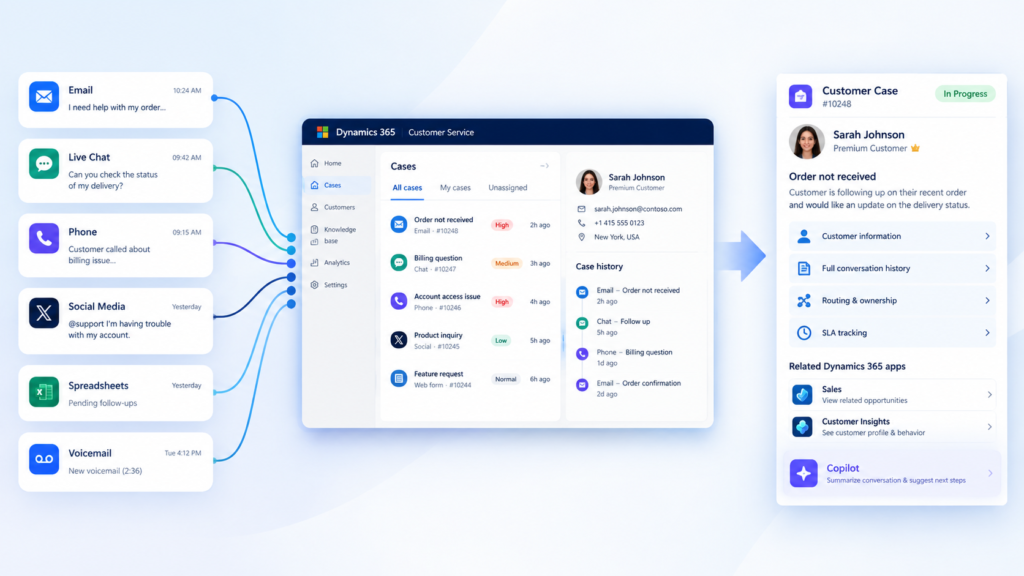
Dynamics 365 Customer Service is a case management and customer support platform that centralizes every service interaction, whether it starts as an email, a chat message, a phone call, or a social post, into a single, trackable case record. Agents work from one screen instead of switching between five tools, and managers get a real-time view of open cases, response times, and team workload.
It replaces the patchwork most growing companies default to: a shared inbox for email, a separate helpdesk tool for tickets, and a spreadsheet to track everything the other two tools cannot see.
Where It Fits Inside the Wider Dynamics 365 CRM Suite
Dynamics 365 Customer Service sits alongside Dynamics 365 Sales and Dynamics 365 Customer Insights as one of Microsoft’s core CRM applications. It can run standalone for a service-only deployment, or connect directly to Sales so that a support case and a sales opportunity for the same account share one customer record. That shared data model is one of the main reasons companies already running another Dynamics 365 app add Customer Service rather than bolting on a separate helpdesk product.
The Problem Dynamics 365 Customer Service is Built to Solve
Most service teams do not lose customers because their agents are unskilled. They lose customers because the information those agents need is scattered.
A few patterns show up constantly in teams before they adopt a real case management system:
- No single view of a customer’s full interaction history across channels
- Cases sitting untouched because no one owns routing them to the right agent
- Response and resolution times that nobody is actually tracking
- Knowledge that lives in one senior agent’s head instead of a shared knowledge base
- Customers repeating their issue every time they switch from chat to phone to email
Dynamics 365 Customer Service addresses all five by putting case history, routing rules, SLA timers, and a searchable knowledge base into one connected system instead of five disconnected ones.
Key Features Inside Dynamics 365 Customer Service
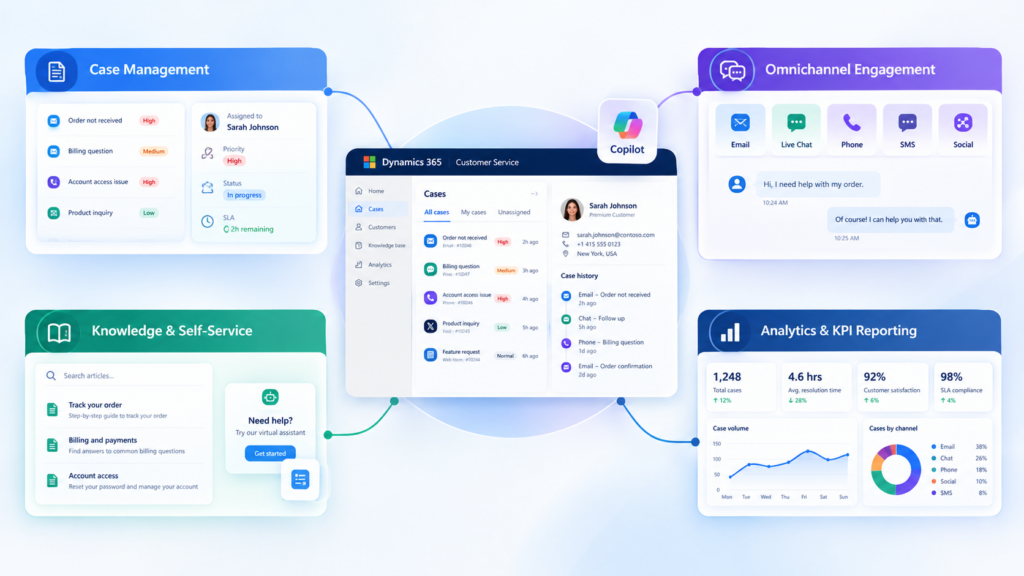
The core Dynamics 365 Customer Service features fall into four groups, and each one solves a specific piece of the fragmentation problem above.
Case Management
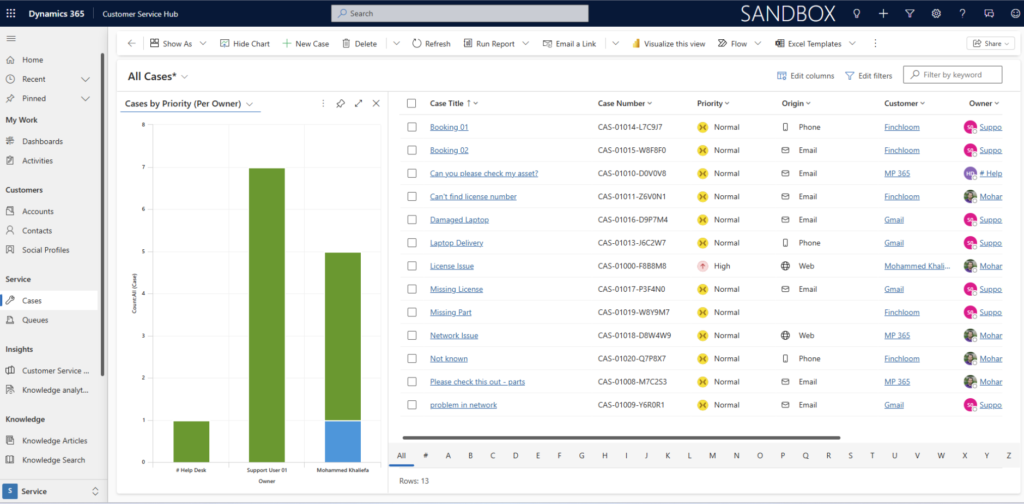
Every customer issue becomes a case record with a full history, an assigned owner, and a status. Rules-based routing can automatically assign cases based on topic, priority, or agent workload, so nothing sits in a queue unclaimed. We walked through exactly what this looks like for one client in our case routing case study, where switching from a shared inbox to automated routing gave a support manager visibility she never had before.
Omnichannel Engagement
Agents work every channel, email, live chat, SMS, and social messaging, from a single unified interface. The customer does not need to repeat their issue when they switch channels, because the full conversation history travels with the case.
Knowledge Management and Self-Service
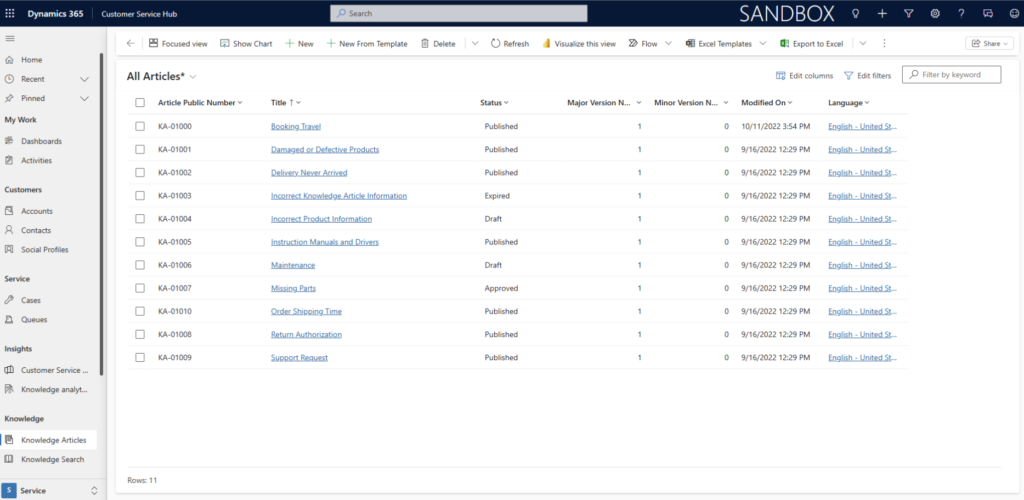
Built-in knowledge authoring tools let teams build a searchable article library that agents can reference during a case and customers can search on their own through a self-service portal. This cuts down repeat questions and shortens resolution time for common issues.
Analytics and KPI Reporting
Dashboards track resolution time, case volume by channel, and agent performance against SLA targets. Managers get the answer to “how many tickets are still open” in seconds instead of stitching it together from four different tools.
“Not sure which of these features your current setup is missing? Contact MP-365 for a free consultation, and we will walk through where your service process is losing time and whether Dynamics 365 Customer Service closes that gap“
AI and Copilot Inside Dynamics 365 Customer Service
Copilot is built directly into the Enterprise and Premium tiers of Dynamics 365 Customer Service, where it drafts case summaries, suggests knowledge articles mid-conversation, and gives agents real-time assistance without leaving the case screen.
Agents spend less time digging through past interactions and more time actually resolving the issue in front of them. It is a meaningful part of what makes the newer tiers worth the upgrade, giving support teams an AI layer that works inside their existing workflow instead of a separate tool.
Dynamics 365 Customer Service Pricing and Plans (2026)
Dynamics 365 Customer Service pricing runs across three tiers, priced per user per month and billed annually. Here is how they break down as of 2026:
| Plan | Price | Best For | Copilot Included |
| Professional | $50/user/month | Streamlined case management for simpler service scenarios | No (Copilot Credits sold separately) |
| Enterprise | $105/user/month | Advanced AI-based tools, Teams integration, unified routing | Yes |
| Premium | $195/user/month | Full contact center capabilities with generative AI | Yes, with included agent capacity |
The Professional plan covers core case management, knowledge management, and unlimited named users, which makes it a reasonable starting point for smaller teams. Enterprise adds Copilot, embedded intelligence, multisession support, and custom app and workflow automation through the Power Platform. Premium layers on workforce engagement management and integrated contact center functionality for teams running complex, high-volume support operations.
Which Tier Fits Your Team
Teams handling straightforward email and phone cases with a small support staff generally start with Professional. Teams that need omnichannel routing, Copilot-assisted case resolution, or deeper reporting typically land on Enterprise instead. If your team is already comparing Dynamics 365 apps by tier, our Dynamics 365 Sales Professional guide breaks down the same kind of tier tradeoffs on the sales side, which is useful context if you are licensing more than one Dynamics 365 application.
Key Takeaways
- The core Dynamics 365 Customer Service features cover case management, omnichannel engagement, knowledge management, and analytics in one platform
- It connects natively to Dynamics 365 Sales and Customer Insights, sharing one customer record across departments
- Dynamics 365 Customer Service pricing runs from $50/user/month (Professional) to $195/user/month (Premium), billed annually
- Copilot is included starting at the Enterprise tier and adds AI-assisted case summaries and knowledge suggestions
- The right tier depends on channel complexity and whether your team needs AI-assisted routing and resolution
Choosing the Right Implementation Partner
Licensing Dynamics 365 Customer Service is the easy part. Configuring routing rules, migrating existing case history, and training agents on a new workflow is where most implementations stall without the right guidance. MP-365 is a Microsoft Solutions Partner specializing in Dynamics 365 and Microsoft 365 Copilot, and we have walked clients through exactly this kind of transition, including the shared inbox fix covered in our case routing case study above.
Getting from a scattered, multi-tool support process to a single connected system does not happen by flipping a switch. It happens by mapping your current case flow, deciding what routing rules actually make sense for your team, and rolling out Dynamics 365 Customer Service in a way that agents adopt instead of resist. If your support team is still stitching together answers from five different places, that is the exact problem this platform, and the right implementation partner, is built to solve.