

Why Support Managers Lose Visibility Without Case Routing
A support manager gets asked a simple question: how many tickets are still open right now. To answer it, they open Outlook, scroll through a shared inbox, and manually count what looks unresolved. There’s no dashboard to check. No case list. Just a shared mailbox and whatever anyone happens to remember about what’s been handled.
That’s not a hypothetical. It’s close to where one MP-365 client’s support process stood before they came to us.
The Client’s Shared Inbox Problem
“We had two reps answer the same customer on the same day because neither of them knew the other had already replied. Meanwhile a client spending six figures with us was waiting three days for a response because their email just got buried.”
That’s roughly how the client described it. Support ran entirely out of a shared inbox. Reps answered whatever email happened to be on top, with no way to see if someone else had already responded. High-value clients had no priority treatment, since the inbox didn’t distinguish between a routine question and an urgent one. Managers had no reliable way to track what was still open without manually opening Outlook and scanning it themselves.
The Technical Gap: No Customer Service Case Routing
Underneath the client’s description was a structural gap: no centralized ticketing system and no Customer Service Case Routing in place. Every inbound email was just an email, not a tracked case with an owner, a status, or a priority level. Without a routing layer, assignment depended entirely on whichever rep happened to open the inbox first, which is how the same customer ends up answered twice while someone else waits three days. This is one of the more common issues we see once a support team outgrows a shared inbox, and it rarely gets fixed until the volume makes the gaps impossible to ignore.
How Customer Service Case Routing Solves It
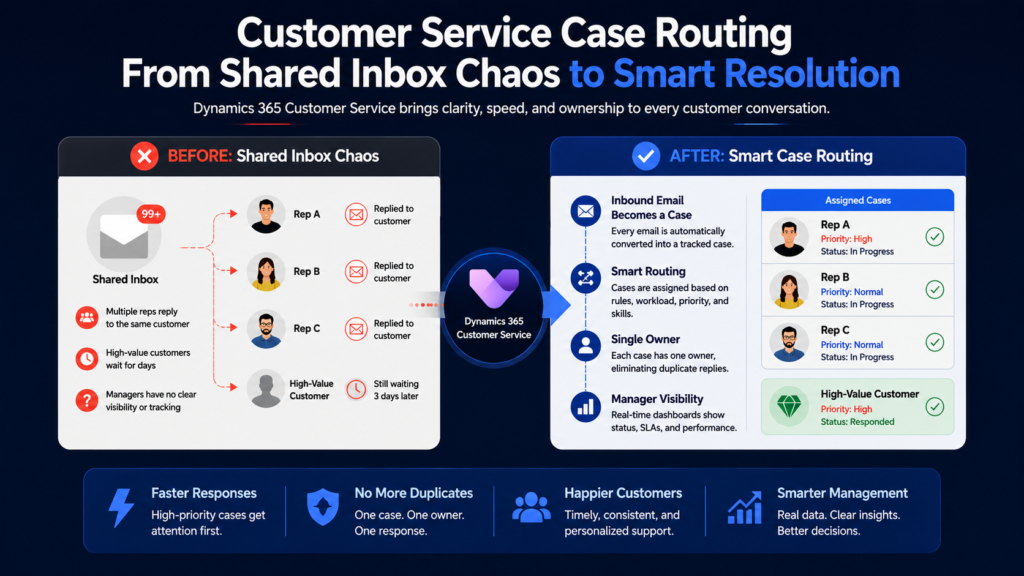
Customer Service Case Routing replaces the shared inbox model with a system where every inbound email automatically becomes a tracked case, owned by one agent, with a status that updates as work happens. Instead of relying on reps to self-coordinate who answers what, the routing logic assigns cases based on rules the business defines, like workload, priority, or agent skill set. A case only has one owner, which means the “did someone already answer this” problem stops being possible by design rather than by memory.
If your support team is still coordinating through a shared inbox, it’s worth a conversation about what a structured case system could look like for your team. Contact MP-365 for a free consultation, and we’ll map out where automated routing removes that coordination gap entirely.
How Unified Routing Works in Dynamics 365 Customer Service
Dynamics 365 Customer Service converts inbound emails into cases automatically the moment they arrive, so nothing sits in an inbox waiting to be manually triaged. Unified Routing then assigns each case based on rules the business sets, whether that’s current agent workload, case priority, required skill set, or a combination of all three.
A high-value client’s email can be flagged for faster handling automatically, rather than depending on a rep recognizing the account name in a crowded inbox. Because each case has a single assigned owner from the moment it’s created, duplicate responses stop being a coordination problem reps have to manage themselves. Customer Service Case Routing handles that assignment logic before a human ever has to think about it.
Results: What Changed After Implementation
For the client, the most visible shift was response time for their highest-value accounts. Cases tied to priority clients got routed and flagged automatically, instead of competing for attention with routine requests in the same inbox. Duplicate replies stopped happening entirely, since a case belonging to one agent isn’t something a second agent can accidentally pick up and answer again.
Managers got a case list they could check directly, which meant the “how many tickets are still open” question had an actual answer instead of a guess based on scrolling through Outlook. Dynamics 365 Customer Service turned support from a shared mailbox into something closer to an actual operational system.
What Case Routing Means for the Support Team
The bigger shift isn’t just faster responses. It’s that accountability stops depending on memory. Reps know exactly which cases are theirs, managers can see case status without opening anyone’s inbox, and high-value clients get handled with actual priority instead of arriving whenever someone happens to notice their email. That’s the real difference between a team managing an inbox and a team running a support system.