

Two Ways to Track a Pipeline
Picture two sales reps closing out their day. The first wraps up a call, opens a spreadsheet, and manually types in what was discussed, what stage the deal is at now, and a reminder to follow up next week. The second finishes the same call and moves on. The system already logged it.
That gap, between tracking that depends on someone remembering to write it down and tracking that happens automatically, is the entire difference between a pipeline a manager can trust and one they have to chase.
What the Client Was Actually Dealing With
“Half our pipeline meeting is just people trying to remember what happened on their calls last week. If someone forgets to update the sheet, that deal basically doesn’t exist until they remember.”
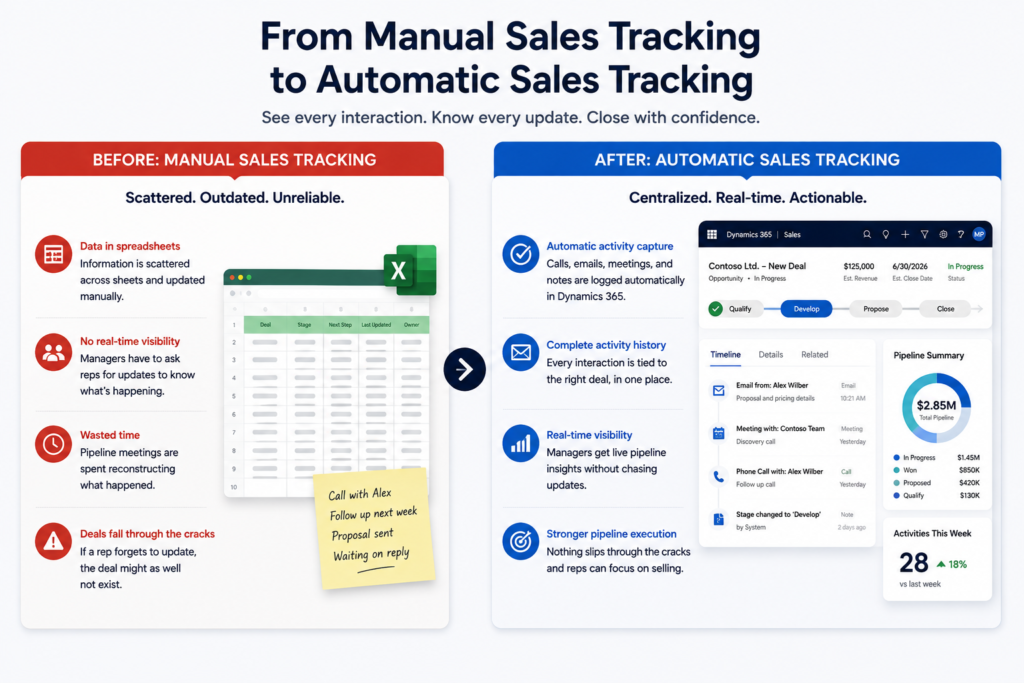
That’s close to what one client told us when they described their sales process before working with MP-365. Reps were tracking calls, emails, and deal stages in a shared spreadsheet, updated whenever someone got around to it. Sales managers had no way to see what was actually happening in the pipeline without asking reps directly, and pipeline meetings became less about strategy and more about reconstructing the week from memory.
The Technical Reality Behind That Frustration
What the client described in plain terms was, underneath it, a Sales Tracking Automation gap. There was no centralized system automatically logging calls, emails, or meetings against the deal record they belonged to.
Every piece of activity data depended on a rep remembering to self-report it after the fact, which meant the spreadsheet was never actually current, just a delayed and incomplete version of what was really happening. Without Sales Tracking Automation in place, visibility into the pipeline was only ever as good as the last person who remembered to update the file.
Where Sales Tracking Automation Changes the Day-to-Day
Sales Tracking Automation replaces self-reported updates with activity that’s captured as it happens. Instead of a rep finishing a call and then separately logging it somewhere else, the interaction is tied to the deal record automatically. Emails, calls, and meetings become part of the pipeline’s real history, not a summary someone has to reconstruct later.
If your team’s pipeline visibility depends on reps remembering to update a spreadsheet, it’s worth a conversation about what that could look like instead. Contact MP-365 for a free consultation, and we’ll map out where automated tracking removes that dependency entirely.
How Dynamics 365 Sales Tracking Actually Works
Dynamics 365 Sales Tracking builds activity logging directly into each deal record. When Outlook is connected, emails and meetings tied to a contact or opportunity are captured automatically, without a rep needing to manually note that the interaction happened.
Calls, notes, and stage changes live on the same timeline, so anyone looking at a deal sees its full history in one place rather than piecing it together from a separate file. Managers pull pipeline visibility from that same activity data, which means the dashboard reflects what actually happened, not what a rep remembered to report at the end of the week.
What Changed for the Client
For the client, the shift was most visible in how pipeline meetings changed. Instead of spending the first stretch of the meeting reconstructing what happened on calls, managers already had that history in front of them before the meeting started.
Deals stopped disappearing from view simply because someone forgot to log an update, and reps stopped losing time on end-of-day data entry that the system was now doing on its own. Dynamics 365 Sales Tracking turned what used to be a reporting exercise into something closer to a shared, always-current record.
What This Means for the Team Day to Day
The real shift isn’t just fewer spreadsheets. It’s that pipeline visibility stops being something a manager has to ask for. Reps spend less time documenting their own work and more time doing it, managers see what’s actually happening without chasing updates, and pipeline meetings become a place to make decisions instead of a place to first figure out what the numbers even are.