


The Lead That Was Already Gone
We recently worked with a client who was losing real business because website leads sat untouched for days before anyone followed up. By the time a rep finally called, the prospect had already signed with someone else, and it wasn’t a one-time miss, it was happening on a regular basis.
We fixed it by connecting their website directly to Dynamics 365, and the difference was immediate: leads that used to wait a week for a response were being contacted the same day. Let me show you how.
What the Client Was Actually Dealing With
“Our web leads get pulled into a spreadsheet once a week. By the time a rep actually calls, half of them have already bought from someone else, and honestly, we don’t even know who was supposed to follow up with who.”
That’s close to how the client described it. Every form submission on their website sat untouched until a weekly export pulled it into a spreadsheet. From there, reps picked leads somewhat informally, with no clear system for who owned what.
A lead that came in on a Monday might not get a call until the following week, and by then, the moment that made them fill out the form in the first place had usually passed.
The Technical Reality Behind That Frustration
What the client described in plain terms came down to a few missing pieces, all pointing to the same gap: no Sales Lead Automation in place.
- No direct connection between the website and the CRM. Form submissions had nowhere to go automatically, so they depended entirely on someone manually pulling them out.
- A manual, periodic export as the only intake step. Leads weren’t visible to sales at all until the weekly export ran, no matter how promising the inquiry.
- No automatic ownership assignment. Once leads did land in the spreadsheet, nothing decided who was responsible for following up, which is how a lead ends up untouched simply because everyone assumed someone else had it.
Put together, the gap between “someone expressed interest” and “someone followed up” was measured in days, sometimes longer, which is more than enough time for a prospect to find an answer elsewhere.
Where Sales Lead Automation Changes the Equation
Sales Lead Automation closes that gap by removing the manual export step entirely. Instead of leads collecting in a spreadsheet until someone remembers to pull them, a website form submission becomes a CRM record the moment it happens.
There’s no weekly batch, no delay waiting on someone to run an export, and no ambiguity about whether a lead has been seen yet. For this client, that meant moving to Dynamics 365 Lead Automation specifically, since their CRM was already Dynamics 365 Sales.
If web leads are sitting in a spreadsheet before anyone follows up, it’s worth a conversation about what an automated handoff could look like for your team. Contact MP-365 for a free consultation, and we’ll map out where automation closes that gap for good.
How the Power Automate Integration Actually Works
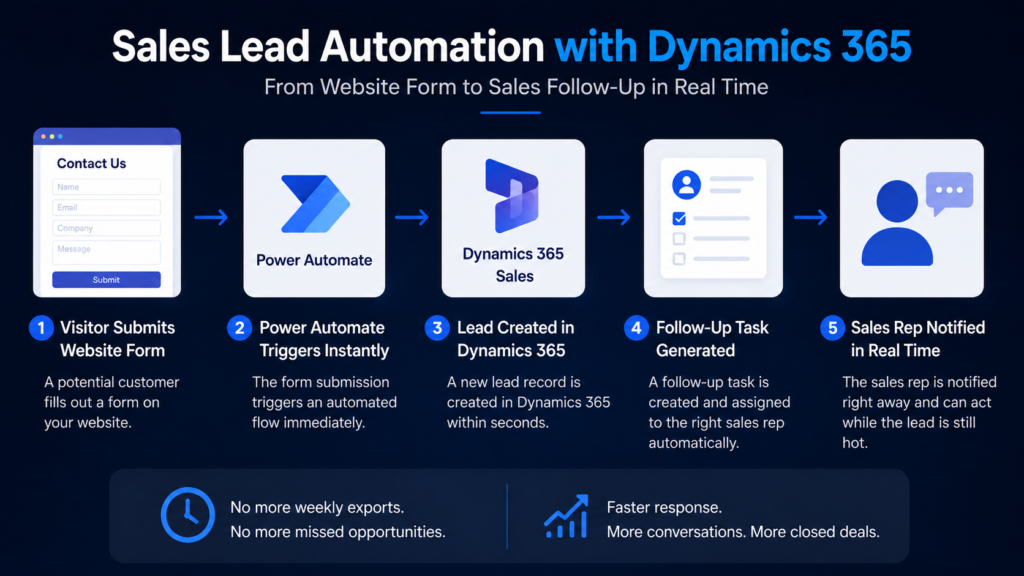
Here’s what actually happens behind the scenes once the integration is in place, broken down step by step:
- A visitor submits the website form. That’s the trigger, nothing else needs to happen first.
- Power Automate kicks in instantly. The submission fires a flow the moment it’s received, with no batching and no waiting on a schedule.
- A contact record is created in Dynamics 365 Sales. The lead exists in the CRM within seconds of the form being submitted, not days later.
- A follow-up task is generated automatically. The system doesn’t just log the lead, it creates the next action that needs to happen.
- That task gets assigned to the right rep. Ownership is decided the moment the lead arrives, so there’s no informal sorting-out afterward.
This is Dynamics 365 Lead Automation working exactly as intended: the moment someone expresses interest, a real person is already on the hook to respond, with no manual handoff step anywhere in between.
What Changed for the Client
The most immediate change was response time. Leads that used to wait up to a week for a first call were being contacted the same day, often within the hour. Ownership stopped being a gray area, since every lead arrived with a task already assigned to a specific rep, which meant nothing sat unclaimed waiting for someone to notice it.
The client also started losing fewer leads to competitors simply because they were no longer the slowest business to respond. Sales Lead Automation turned a process that used to run on a weekly cycle into one that runs the moment a prospect takes action.
Conclusion: What This Means for the Sales Team Day to Day
The bigger shift isn’t just faster follow-up. It’s that response speed stopped depending on someone remembering to run an export or check a spreadsheet. With Dynamics 365 Lead Automation handling the handoff, reps get leads the moment they’re worth having, with ownership already clear, and prospects hear back while they’re still actively deciding, not after they’ve already chosen someone else. That’s the real difference between a sales team reacting to old data and one that’s actually in the room when the decision gets made.