

The Tier Built for “Not Yet”
Not every sales team needs a fully customizable, AI-loaded CRM on day one. Some just need a clean, reliable way to track leads, manage a pipeline, and stop losing deals to a messy spreadsheet.
That’s exactly the gap Dynamics 365 Sales Professional was built to fill. It isn’t a stripped-down, lesser version of Dynamics 365 Sales, it’s a deliberately right-sized entry point for businesses that don’t need (or don’t want to pay for) the full complexity of the Enterprise tier yet.
The real question this guide answers isn’t “is this good software” it’s when does this tier actually fit, and where’s the ceiling before you outgrow it?
What Is Dynamics 365 Sales Professional?
Dynamics 365 Sales Professional is the entry-level licensing tier of Microsoft’s Dynamics 365 Sales CRM, built for small to mid-sized businesses running straightforward, linear sales processes.
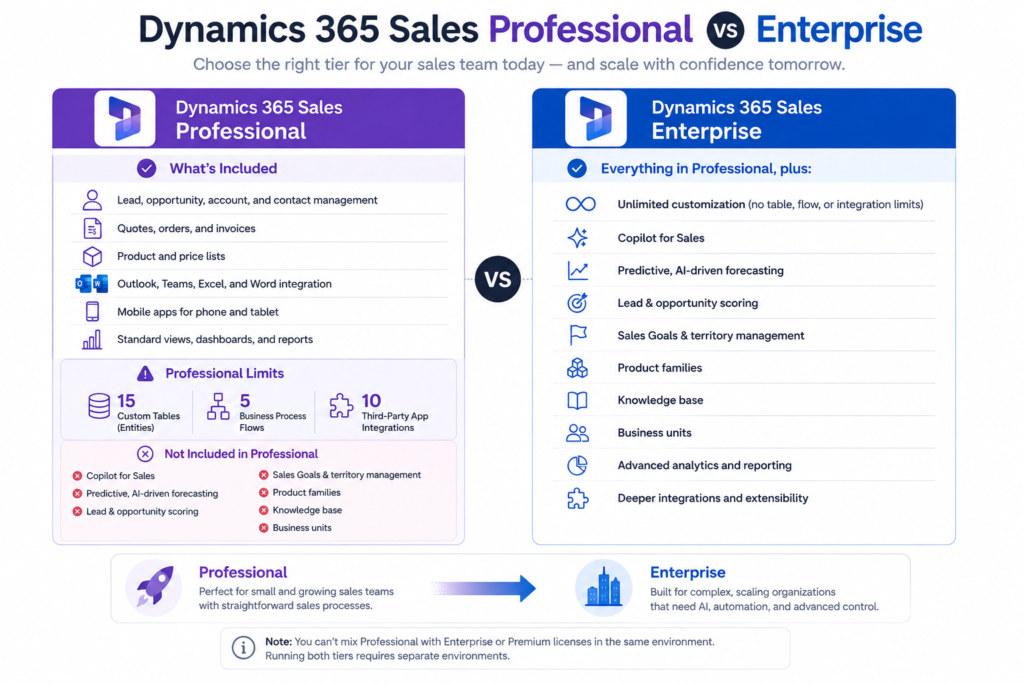
It sits below Sales Enterprise and Sales Premium in the D365 for Sales lineup, those two tiers add advanced customization, AI-driven insights, and deeper analytics that Professional deliberately leaves out, in exchange for a simpler setup and a lower price point.
In short: if your sales process doesn’t involve dozens of custom workflows, multiple territories, or AI-assisted forecasting, D365 for Sales at the Professional tier is often enough to run the whole operation.
What’s Included in D365 for Sales Professional tier
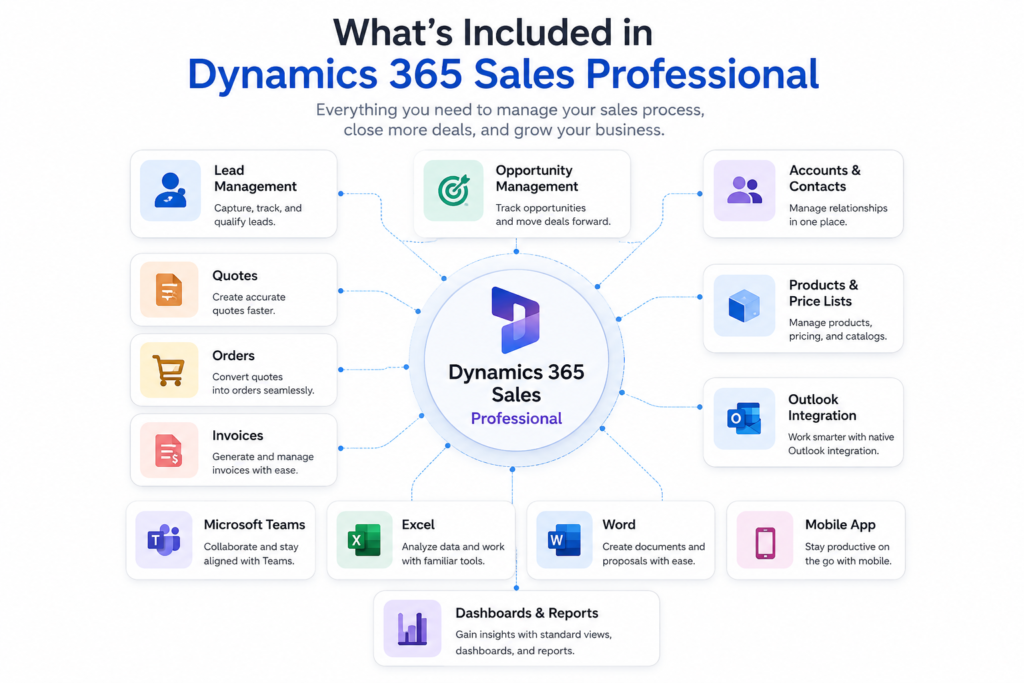
Professional tier covers the core of what most small and growing sales teams actually need day to day:
- Lead, opportunity, account, and contact management
- Quotes, orders, and invoices
- Product and price lists
- Mobile apps for phone and tablet
- Native integration with Outlook, Teams, Excel, and Word
- Standard views, dashboards, and reports
For a business running a fairly linear sales cycle, inquiry, quote and close this covers the full lifecycle without requiring a single custom build.
Where the Ceiling Is: Professional’s Real Limitations
This is the part most pricing pages gloss over, but it’s exactly what determines whether this D365 for Sales Professional will still fit in a year.
Dynamics 365 Sales Professional comes with three hard, fixed caps:
- A maximum of 15 custom tables (entities)
- A maximum of 5 business process flows
- A maximum of 10 third-party app integrations
Beyond those caps, several capabilities are excluded from this tier entirely:
- Copilot for Sales
- Predictive, AI-driven forecasting
- Embedded intelligence and lead/opportunity scoring
- Sales Goals and territory management
- Product families
- Knowledge base
- Business units
None of this makes Professional a weaker product, it’s the direct tradeoff for the lower price and the simpler, faster setup. The caps only become a real problem when a business’s actual sales process outgrows them.
What Does D365 Sales Professional Cost in 2026
List pricing for Dynamics 365 Sales Professional runs around $65 per user, per month.
There’s a detail worth knowing that most buyers miss: if an organization already owns another Dynamics 365 application, Sales Professional is available at steep “attach pricing” roughly $20 per user, per month instead of the full list rate.
One licensing rule to plan around: D365 for Sales Professional licenses can’t be mixed with Enterprise or Premium licenses inside the same environment. Running both tiers at once. say, during a phased upgrade requires two separate environments, not one shared one.
Signs You’re About to Outgrow Professional
Rather than a generic feature checklist, here’s what actually shows up in practice when a business has outgrown Dynamics 365 Sales Professional:
- Hitting the 15-table limit while trying to model a new part of the business
- Needing forecasting accuracy beyond what manual tracking in spreadsheets can deliver
- Wanting AI-assisted lead or opportunity scoring instead of a rep manually prioritizing a flat list
- Managing multiple sales territories or teams that need separate goals and reporting
- Running more than 5 distinct sales processes across different products or business units
If two or more of these sound familiar, that’s usually the real signal not a sales pitch, just a practical ceiling being reached.
Moving to Enterprise Later
The upgrade path from Professional to Enterprise is seamless. Data carries over intact, and advanced features become available immediately once the upgrade goes through, there’s no migration project required to make the jump.
Choosing D365 Sales Tier From Day One
Picking between Professional and Enterprise isn’t just a pricing decision, it’s a decision about how much complexity a sales process actually has right now, versus how much it’s likely to have in twelve months. Overbuying into Enterprise too early means paying for AI and customization capabilities nobody’s using yet. Underbuying into Dynamics 365 Sales Professional past its ceiling means hitting caps mid-quarter and scrambling to upgrade under pressure.
This is exactly where MP-365 helps, assessing where a sales process actually sits today, choosing the tier that fits that reality, and handling the upgrade cleanly when the time comes. Visit MP-365 for a free consultation to figure out which tier is the right fit for your team.
Conclusion: Right-Sized, Not Limited
Dynamics 365 Sales Professional isn’t a compromise version of Dynamics 365 Sales, it’s correctly scoped for the business it was built for. The real skill isn’t picking the “best” tier on paper. It’s knowing honestly which business you actually are right now, and choosing accordingly.