

Copilot Cowork Dynamics 365 is a combination of two connected but separate things: Copilot Cowork, which is an agentic execution layer built into Microsoft 365 Copilot, and Dynamics 365, which provides the business data accounts, opportunities, pipeline records, and customer interactions that Cowork pulls from to complete real work.
When the two are connected through a plugin, sales teams can stop switching between apps to gather information, draft communications, and update records, and instead describe the outcome they want in natural language while Cowork handles the steps. This is not a Dynamics 365 feature and it is not a Copilot agent. It is a user-directed, multi-step AI workflow tool that happens to become significantly more powerful when it has access to your CRM data.
What Is Microsoft Copilot Cowork?
Microsoft Copilot Cowork is an agentic orchestrator built into Microsoft 365 Copilot that executes multi-step tasks across your Microsoft 365 environment on your behalf, not just assists with them.
Here is what that looks like in practice:
- You describe an outcome in natural language “prepare a briefing for my meeting with this account” or “follow up on all open opportunities this week”
- Cowork breaks it into a sequence of steps
- It works through those steps across Outlook, Teams, Word, Excel, SharePoint, and your calendar
- Before each action, it surfaces what it plans to do and waits for your approval
- Nothing is sent, created, or updated without you confirming it first
How Is This Different From Copilot Agents?
This is where most people get confused and it matters. Copilot Agents are built to run autonomously. They execute on a trigger or a schedule, without someone directing each step. Cowork is fundamentally different:
- Agents run on their own once configured
- Cowork runs with you it handles the execution while you stay in control of every decision
- Agents are designed to remove human involvement from a process
- Cowork is designed to handle the effort of a process while keeping you in the loop at every checkpoint
This human-in-the-loop design is not a limitation of Cowork it is the point. For complex, judgment-driven work involving customer relationships and live business data, having a human review each step before it happens is exactly what most organizations need.
Copilot Cowork Availability
As of May 2026, Microsoft Copilot Cowork is available to Microsoft 365 Copilot customers enrolled in the Frontier program, and runs across:
- Desktop and browser
- Outlook and Teams
- iOS and Android
How Does Copilot Cowork Connect to Dynamics 365?
Copilot Cowork Dynamics 365 integration works through a dedicated plugin model. Cowork does not live inside Dynamics 365; instead, it reaches into your Dynamics 365 environment and pulls the business data it needs to complete the task you have described, then acts on that data across your Microsoft 365 tools in a single connected workflow.
The Dynamics 365 Plugin: How It Works
To connect Cowork to Dynamics 365, your admin enables the relevant plugin through the Microsoft 365 admin center. Microsoft provides three dedicated Dynamics 365 plugins for Cowork:
- Dynamics 365 Sales: access to accounts, contacts, leads, opportunities, and pipeline data
- Dynamics 365 Customer Service: access to cases, customer interactions, and service history
- Dynamics 365 ERP: access to finance and operations data including orders, bids, and vendor records
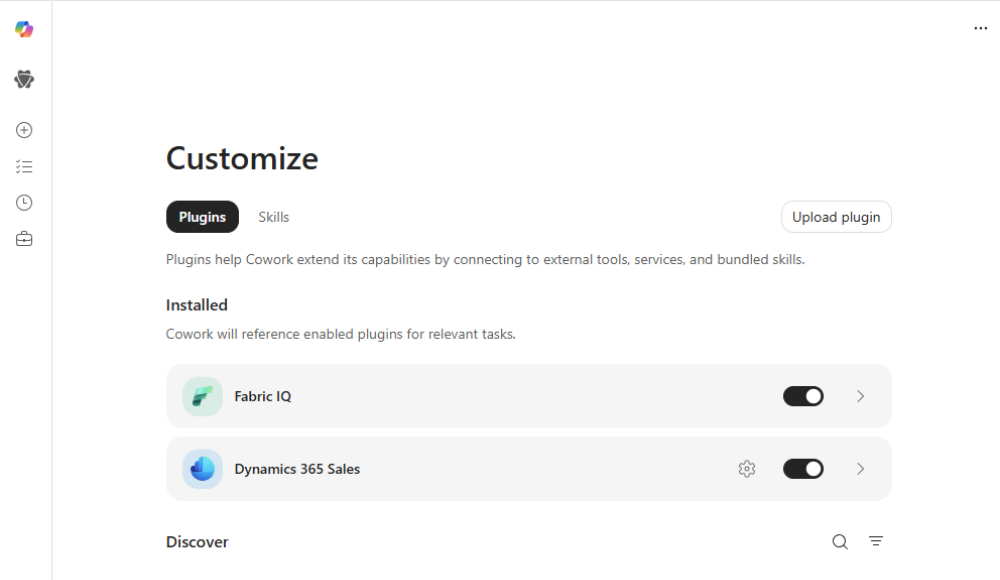
The Sales and Customer Service plugins are enabled by default for Microsoft 365 Copilot Frontier customers. Authentication runs through Microsoft Entra ID, and Cowork respects the exact same user-level permissions already set inside your Dynamics 365 environment meaning users can only access data they are already authorized to see.
What Dynamics 365 Data Can Cowork Access?
Once the plugin is active, Cowork can surface and work with Dynamics 365 data as part of a broader task. This includes:
- Account and contact records
- Open and closed opportunities
- Lead information and qualification history
- Activity history and meeting notes
- Customer interaction records
- Sales pipeline data
- Case records and service history
- Order and vendor information (ERP)
Why This Matters for Dynamics 365 Users
Most Dynamics 365 users already spend time manually pulling this information together — reviewing records before a meeting, checking pipeline status before a review call, or searching through activity history before a follow-up. The Copilot Cowork Dynamics 365 plugin changes that. Instead of navigating between records and apps to gather context, users describe what they need and Cowork assembles it grounded in live CRM data and then takes the next steps across Outlook, Teams, and the rest of Microsoft 365.
This is also where the difference from Copilot Agents becomes naturally visible. An agent connected to Dynamics 365 might automatically update a record when a deal stage changes, or send a notification when an opportunity goes cold and it runs in the background without anyone asking.
Microsoft Copilot Cowork, by contrast, brings that same Dynamics 365 data into a task you initiate, combining it with emails, documents, and calendar context to help you complete something more complex and judgment-driven than an agent would handle on its own.
What Can Copilot Cowork Do With Dynamics 365 Data?
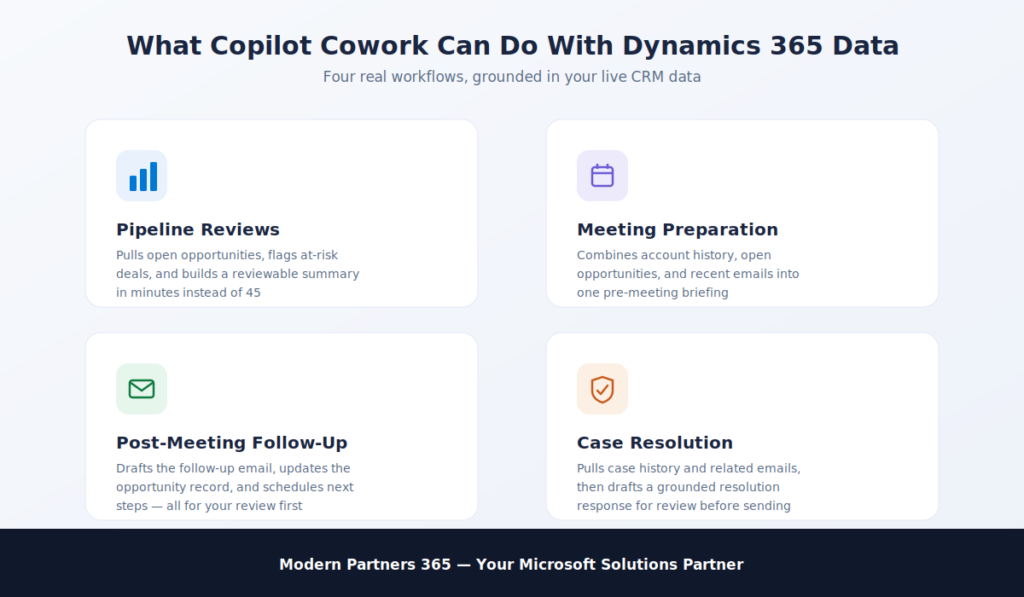
This is where Copilot Cowork Dynamics 365 moves from concept to measurable business value. Because Cowork can combine live CRM data with emails, documents, meetings, and calendar context, it can support end-to-end workflows that would otherwise require a salesperson to manually switch between multiple applications and piece everything together themselves. Below are the most impactful real-world scenarios.
Pipeline Reviews
A pipeline review typically means opening Dynamics 365, filtering opportunities by stage, cross-referencing recent emails, checking Teams conversations, and then building a summary or presentation manually. With Copilot Cowork Dynamics 365, that entire process becomes a single request:
- Cowork pulls open opportunities directly from Dynamics 365 Sales
- Cross-references recent emails and Teams conversations related to those accounts
- Identifies at-risk deals based on activity history and last contact dates
- Builds a formatted pipeline summary or PowerPoint presentation
- Surfaces it for your review before anything is shared
What would take 45 minutes of manual work gets handed off and comes back as a finished, reviewable output.
Meeting Preparation
Before a customer meeting, salespeople typically need account history, open opportunities, recent interactions, and outstanding action items pulled from at least three different places. Cowork handles all of it in one workflow:
- Pulls the account record and opportunity details from Dynamics 365
- Reviews recent email threads with the contact in Outlook
- Surfaces open action items from previous meetings in Teams
- Combines everything into a single pre-meeting briefing document
- Ready before the meeting, without the manual preparation
Post-Meeting Follow-Up
Follow-up is where deals are won or lost and it is also where salespeople lose the most time to repetitive administrative work. After a meeting, Cowork can:
- Draft a follow-up email based on meeting notes and Dynamics 365 activity history
- Create an action-item list from what was discussed
- Schedule next steps directly in the calendar
- Update the relevant opportunity record in Dynamics 365
- Post a summary to the relevant Teams channel for internal visibility
It is worth noting here that this is a scenario where people sometimes ask: could a Copilot agent do this instead? An agent could be configured to trigger a follow-up email automatically after a meeting ends but it would apply the same template to every meeting, every time, without reading the room. \
Cowork reads the actual meeting context, the relationship history from Dynamics 365, and the tone of recent emails, then drafts something that reflects the specific conversation and still puts it in front of you for review before it goes anywhere.
Case Resolution: Customer Service
For teams using Dynamics 365 Customer Service, Cowork can bring case data into a resolution workflow without the agent ever leaving their current working context:
- Pulls the full case history and previous interactions from Dynamics 365
- Reviews related emails and any attached documents
- Drafts a resolution response grounded in both the case record and recent communication
- Surfaces it for review before sending
Order and Bid Management: ERP
For organizations using Dynamics 365 ERP, Microsoft Copilot Cowork can support procurement and operations workflows that typically require navigating multiple records manually:
- Retrieves bid details from vendor emails and PDF attachments
- Updates RFQ replies directly inside Dynamics 365 finance and operations
- Scores bids against configured criteria
- Recommends the supplier to award with a full summary for human review before any decision is finalized
Want to see which of these workflows fits your Dynamics 365 environment right now? Modern Partners 365 helps organizations identify the highest-impact starting points for Copilot Cowork. Contact Modern Partners 365
What Are Copilot Cowork Skills and Why Do They Matter for Dynamics 365 Users?
One of the most practical and most misunderstood features of Microsoft Copilot Cowork is Skills. Once you have run a workflow a few times, you start to notice that certain tasks follow the same structure every time. The same pipeline review format every Monday. The same meeting prep checklist before every customer call. The same follow-up email structure after every demo. Skills are how Cowork turns those repeatable processes into something you never have to rebuild from scratch.
What Exactly Is a Cowork Skill?
A Skill is a reusable set of instructions that tells Cowork how to complete a specific task or workflow. It captures:
- The structure you want the output to follow
- The tone and format that fits your team or brand
- The data sources Cowork should pull from including Dynamics 365
- The steps it should take and in what order
- Any specific checkpoints where you want to review before proceeding
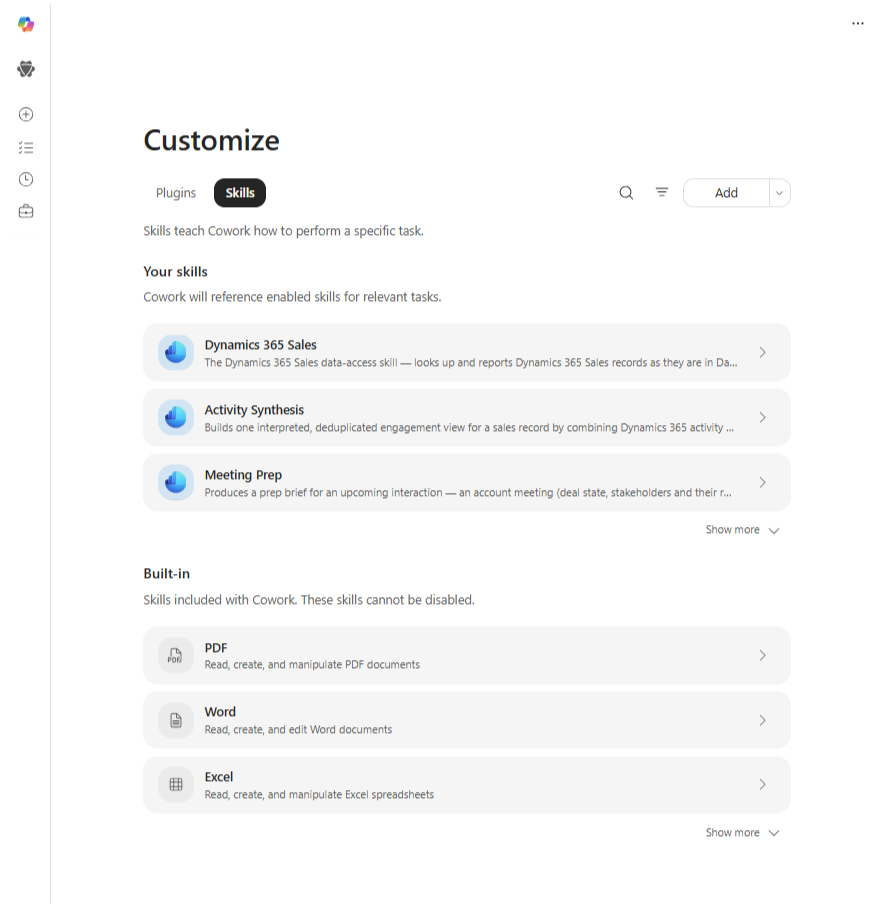
Once a Skill is saved, you can trigger the entire workflow with a single prompt instead of re-explaining the process every time.
A Real Example: Weekly Pipeline Review Skill
Here is what a pipeline review Skill connected to Copilot Cowork Dynamics 365 might look like in practice:
- Every time it is triggered, Cowork pulls open opportunities from Dynamics 365 Sales
- Filters by stage, deal size, or last activity date based on your saved preferences
- Cross-references recent emails and Teams conversations for each account
- Builds the pipeline summary in your preferred format a Word document, a PowerPoint, or a structured Teams post
- Delivers it to the right people before the review meeting
Same output. Same structure. Every week. Without starting over.
Skills vs. Copilot Agents: The Most Common Confusion
This is genuinely the point where most people conflate Cowork with Copilot Agents and it is worth being very clear about the difference.
A Skill does not run on its own. It does not wake up on Monday morning, pull your pipeline data, and send a report to your team automatically. That is what a Copilot agent would do, configured once in Copilot Studio, connected to Dynamics 365, set to trigger on a schedule, and fully autonomous from that point forward.
A Skill is more like a saved recipe:
- Copilot Agent: The chef who shows up every Monday and makes the same dish automatically, whether you asked or not
- Cowork Skill: The recipe that makes it effortless to cook the dish yourself but you still have to decide when to make it, review it before it leaves the kitchen, and confirm it is ready to serve
For organizations that want consistency without removing human judgment from the process, Skills are exactly the right tool. For processes that are so well-defined and repetitive that no human review is needed, a Copilot agent is the better fit.
Many Dynamics 365 organizations will eventually use both agents handling the fully automated background work, Cowork Skills handling the structured but judgment-driven workflows that still need a human in the loop.
Copilot Cowork vs. Copilot Agents: What Is the Actual Difference?
This is the question that comes up most often when organizations start exploring Copilot Cowork Dynamics 365 and it is also the question that is most frequently answered incorrectly. Both Copilot Cowork and Copilot Agents are part of Microsoft’s agentic AI ecosystem. Both can connect to Dynamics 365. Both can automate work. But they are built for fundamentally different situations, and choosing the wrong one for a given process will either leave you with too little automation or too little control.
The Core Distinction
The clearest way to separate them is this:
- Copilot Cowork is for complex, judgment-driven work that spans multiple apps and data sources where a human needs to stay involved, review outputs, and approve actions before they happen
- Copilot Agents are for repetitive, rule-based, high-volume processes where the workflow is well-defined enough that it can run autonomously without someone directing each step
Neither is more advanced than the other. They solve different problems.
Copilot Cowork vs. Copilot Agents Full Comparison
| Criteria | Copilot Cowork | Copilot Agents |
| What it is | M365 Copilot agentic execution layer you direct conversationally | Purpose-built autonomous bots for specific automated tasks |
| How it runs | You trigger it and approve each step | Runs autonomously on triggers or schedules |
| User control | High, approval required at every action | Low to none, designed to run without interruption |
| Best for | Multi-step tasks spanning several apps and data sources | Repetitive, rule-based, high-volume processes |
| Dynamics 365 access | Via plugin, on demand, as part of a broader task | Via connector or Power Automate, on trigger or schedule |
| Where it lives | Microsoft 365 Copilot Frontier program | Copilot Studio and Microsoft 365 agent ecosystem |
| Requires human input | Yes, conversational direction and approval required | No, runs to completion independently once configured |
| Output type | Documents, emails, summaries, briefings, calendar events | Data updates, automated notifications, triggered responses |
| Who controls the workflow | The user, at every checkpoint | The organization at setup, then fully autonomous |
| Customization | Via Skills and Dynamics 365 plugins | Via Copilot Studio, Power Automate flows, and connectors |
| Human review before action | Always | Not required, depends on configuration |
| Ideal Dynamics 365 scenario | Pipeline reviews, meeting prep, follow-up workflows, case resolution | Auto-updating records, lead scoring, scheduled reporting, alerts |
How to Decide Which One Your Organization Needs
Use this as a practical decision framework:
- Choose Copilot Cowork when the task is complex, involves multiple data sources, requires reading context and tone, and benefits from a human reviewing the output before it reaches a customer or stakeholder
- Choose Copilot Agents when the task is clearly defined, follows the same rules every time, needs to run at scale or on a schedule, and does not require human judgment to complete correctly
- Use both when your Dynamics 365 workflows include a mix agents handling the predictable background automation while Cowork handles the complex, relationship-driven work that still needs a person in the loop
A Practical Example Inside Dynamics 365
Consider a sales team managing a large pipeline in Dynamics 365 Sales:
- A Copilot agent could be configured to automatically flag opportunities that have had no activity in 14 days, update the opportunity stage, and send an internal alert to the account owner no human needed, runs every night
- Copilot Cowork could then be used by that account owner to take action pulling the flagged opportunity from Dynamics 365, reviewing the email history with the contact, drafting a re-engagement message, and scheduling a follow-up call all in one workflow, with the account owner approving each step before anything is sent
The agent does the monitoring. Cowork does the thinking and the doing with a human still in the seat.
What Does Your Organization Need Before Implementing Copilot Cowork With Dynamics 365?
Getting value from Copilot Cowork Dynamics 365 does not start with turning on a plugin. It starts with making sure the right foundations are in place because Cowork is only as good as the data, permissions, and processes it has access to. Organizations that skip this step often find that their outputs are incomplete, inconsistent, or require more manual correction than the workflow was supposed to eliminate in the first place.
1. Licensing and Program Enrollment
Before anything else, confirm that your organization meets the baseline requirements:
- An active Microsoft 365 Copilot license is required Cowork is not available on standard Microsoft 365 plans
- Enrollment in the Microsoft 365 Frontier program is required to access Cowork
- A Dynamics 365 Sales, Customer Service, or ERP license is required depending on which plugin you intend to use
- Plugin deployment is handled through the Microsoft 365 admin center the Dynamics 365 Sales and Customer Service plugins are enabled by default for eligible tenants
If your organization is not yet on Microsoft 365 Copilot or has not enrolled in Frontier, that is the starting point everything else comes after.
2. Dynamics 365 Data Quality
This is the foundation that most organizations underestimate. Microsoft Copilot Cowork pulls its business context directly from Dynamics 365 and if the data inside your CRM is incomplete, outdated, or inconsistently maintained, the workflows Cowork builds around that data will reflect those gaps.
Before enabling the Dynamics 365 plugin, review the following:
- Account and contact records: are they complete, deduplicated, and up to date?
- Opportunity records: do they accurately reflect current stage, value, and expected close date?
- Activity history: are meetings, calls, and emails being logged consistently?
- Lead records: is qualification information captured in a structured way?
- Pipeline hygiene: are closed, stale, or inactive records being managed and archived?
A Cowork workflow built on clean Dynamics 365 data produces reliable, usable outputs. The same workflow built on messy CRM data produces outputs that require significant manual correction which defeats the purpose entirely.
3. User Readiness and Adoption
Cowork requires users to describe outcomes clearly in natural language. This sounds simple, but in practice it is a skill that needs to be developed especially for teams that are used to navigating Dynamics 365 manually rather than delegating work to an AI system.
Best practices for user readiness include:
- Start with high-impact, familiar workflows pipeline reviews and meeting prep are the easiest entry points because users already know what a good output looks like
- Provide role-specific guidance a salesperson and a customer service manager will use Cowork very differently; training should reflect that
- Set clear expectations about what Cowork handles vs. what still needs human judgment especially for customer-facing outputs
- Gather feedback early the first few weeks of usage will reveal which workflows save the most time and which need refinement
- Measure before and after time spent on pipeline admin, meeting prep, and follow-up communication are all measurable baselines
Organizations that invest in user readiness get faster returns. Organizations that simply turn Cowork on and expect adoption to happen organically tend to see underutilization.
4. Governance and Security
Because Copilot Cowork Dynamics 365 works with live customer data, opportunity records, and business communications, governance is not optional it is a prerequisite for scaling confidently.
The good news is that Cowork operates within Microsoft’s existing security and permission framework:
- Users can only access Dynamics 365 data they are already authorized to see Cowork does not create new data access, it uses existing permissions
- Microsoft Purview audit logs capture all Copilot Cowork activity, including plugin interactions with Dynamics 365
- Plugins can be restricted by user group or disabled entirely through the Microsoft 365 admin center
Beyond the technical controls, organizations should also define:
- AI usage policies: what types of outputs require human review before being sent externally?
- Approval workflows: who reviews Cowork outputs for customer-facing communications?
- Role-based access: which teams or individuals should have access to which Dynamics 365 plugins?
- Change management procedures: how will process changes driven by Cowork be communicated and documented across the organization?
The difference between Cowork governance and agent governance is worth noting here. With Copilot agents, governance is primarily about what the agent is configured to do upfront because once it runs, it runs autonomously.
With Cowork, governance is more about what happens at the output stage because a human is always in the loop, the risk is less about runaway automation and more about ensuring that human approvals are actually being applied thoughtfully rather than rubber-stamped.
Conclusion: Is Copilot Cowork the Right Fit for Your Dynamics 365 Organization?
Copilot Cowork Dynamics 365 is not the right tool for every organization at every stage and being honest about that is more useful than overselling it. The organizations that get the most value from Cowork share a few common characteristics, and understanding where your organization sits relative to those characteristics is the most practical starting point.
Copilot Cowork Is a Strong Fit If Your Organization:
- Is already using Microsoft 365 Copilot and wants to move beyond single-prompt assistance into multi-step workflow execution
- Has sales, customer service, or operations teams spending significant time on manual coordination meeting prep, pipeline reviews, follow-up communication, case research
- Uses Dynamics 365 Sales, Customer Service, or ERP and maintains reasonably clean, up-to-date CRM data
- Wants to introduce AI-driven automation while keeping human oversight in place especially for customer-facing outputs
- Is not yet ready to fully automate processes end-to-end but wants to meaningfully reduce the manual effort involved in completing them
Copilot Cowork May Not Be the Right Starting Point If Your Organization:
- Does not yet have a Microsoft 365 Copilot license or Frontier program enrollment in place that is the prerequisite, and it needs to come first
- Has significant Dynamics 365 data quality issues that have not been addressed investing in Cowork before the CRM data is reliable will produce unreliable outputs
- Is looking for fully autonomous, trigger-based automation that runs without any human involvement that is a Copilot agent use case, not a Cowork use case
- Expects Cowork to replace Dynamics 365 Copilot inside the CRM they are complementary tools, not alternatives to each other
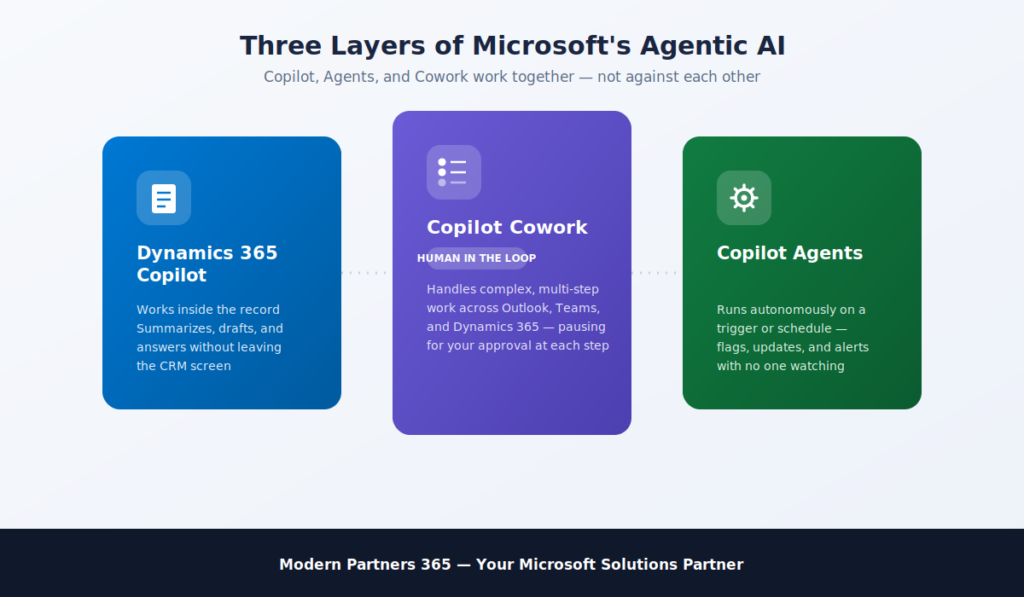
Where Cowork, Agents, and Dynamics 365 Copilot Fit Together
One of the most common mistakes organizations make when evaluating Microsoft Copilot Cowork is treating it as an either/or decision against agents or Dynamics 365 Copilot. In practice, the most effective Microsoft AI strategies use all three layers together:
- Copilot inside Dynamics 365 handles AI assistance within the CRM itself summarizing records, generating emails from within a lead or opportunity, answering questions about a specific account without leaving the app
- Copilot Agents handle fully autonomous background automation flagging stale opportunities, triggering notifications, updating records based on rules, running scheduled reporting without anyone initiating it
- Copilot Cowork sits in the middle handling the complex, multi-step, judgment-driven work that is too nuanced for an agent to run autonomously but too time-consuming for a human to do manually every time
These three layers do not compete with each other. They cover different parts of the same workflow. An agent surfaces the problem, Cowork helps the human address it, and Dynamics 365 Copilot supports the detailed CRM work that happens inside the record itself.
What to Do Next?
If your organization is already on Microsoft 365 Copilot and using Dynamics 365, the most practical next step is identifying which workflows are consuming the most manual time right now pipeline reviews, meeting preparation, post-meeting follow-up, case resolution and mapping those against what Copilot Cowork Dynamics 365 can handle with the Sales, Customer Service, or ERP plugin enabled.
That mapping exercise does not need to be complex. It needs to be honest about where your data quality stands, which teams are ready to adopt a new way of working, and which processes still require enough human judgment that removing oversight would create risk rather than efficiency.
The organizations that get this right do not start by automating everything. They start by identifying one or two high-impact workflows, running Cowork against them with real Dynamics 365 data, measuring the time saved and the output quality, and then expanding from there.