

In this article, you’ll learn what Copilot Agents Dynamics 365 capabilities look like in practice, how Copilot Agents Business Automation can support sales processes, and what businesses should consider when implementing these technologies.
Copilot Agents in Dynamics 365 can work to automate business processes by combining AI-powered task execution, workflow orchestration, and real-time access to business data. This allows organizations to move beyond simple AI assistance and begin automating repetitive work across sales and customer engagement activities.
Many businesses already use Dynamics 365 to manage leads, opportunities, customer interactions, and sales pipelines. However, sales teams still spend a significant amount of time researching accounts, preparing for meetings, updating CRM records, and following up with prospects. This is where Copilot Agents Business Automation becomes increasingly valuable.
Unlike traditional AI tools that only generate content or answer questions, Microsoft Copilot Agents can coordinate actions across systems, follow predefined instructions, and support end-to-end workflows autonomously without requiring a human to trigger each step. As a result, organizations can reduce administrative effort and focus more time on generating revenue.
How Does Microsoft Copilot Agents Connect With Dynamics 365?
Copilot Agents connect with Dynamics 365 by bringing CRM data, business context, and AI-powered task execution into a single experience. Instead of manually gathering information, switching between applications, or repeating routine tasks, users can leverage Microsoft Copilot Agents to access insights and complete work more efficiently.
For organizations using Dynamics 365 Sales, this means sales teams can spend less time on administration and more time engaging with prospects and customers. By combining customer data with AI-driven workflows, Microsoft Copilot Agents can help transform stored information into actionable business outcomes.
How Does Microsoft Copilot Agents Access Dynamics 365 Data?
Microsoft Copilot Agents can use information stored within Dynamics 365 to provide relevant context and support business processes. Rather than requiring users to search through multiple records manually, they can surface important details when they are needed.
Examples of information that can support Microsoft Copilot Agents business automation include:
- Lead and contact records
- Account information
- Opportunity details
- Activity history
- Meeting notes
- Customer interactions
- Sales pipeline data
This allows users to work with up-to-date business information while reducing the time spent searching for data across multiple systems.
What Is the Difference Between Copilot Agents and Dynamics 365 Copilot?
While both are native Microsoft solutions, Copilot Agents and Dynamics 365 Copilot serve fundamentally different purposes. The key distinction comes down to business automation vs assistance.
Dynamics 365 Copilot is a reactive, user-triggered AI assistant embedded directly inside specific Dynamics 365 applications. It helps users accomplish tasks faster by generating content, summarizing records, and surfacing insights but it requires a human user to start every action.
On the other hand, Microsoft Copilot Agents are proactive and autonomous. They can execute multi-step workflows across systems independently, without a human user needing to trigger each individual step. This makes them suited for orchestrating broader, end-to-end business processes rather than assisting with individual tasks.
Side-by-Side Comparison Copilot Agents vs Dynamics 365 Copilot:
| Feature | Dynamics 365 Copilot | Copilot Agents |
| Primary Focus | Assistance within Dynamics 365 applications | End-to-end business process execution |
| Scope | Application-specific | Cross-functional workflows |
| Main Use Case | Helping users complete tasks inside Dynamics 365 | Coordinating multi-step business processes autonomously |
| Data Sources | Dynamics 365 data | Dynamics 365, Microsoft 365, and connected business systems |
| User Interaction | Task assistance and recommendations | Autonomous workflow execution and process support |
| Best For | Individual productivity | Dynamics 365 AI Automation |
When Should Businesses Use Each Solution?
Businesses should use Dynamics 365 Copilot when they want AI assistance directly inside sales workflows, records, and customer interactions. It helps users summarize information, generate content, and complete day-to-day CRM activities more efficiently.
Copilot Agents become valuable when organizations want to standardize and automate larger business processes with minimal human intervention. For example, instead of simply helping a salesperson write an email, a Copilot Agent can autonomously execute an entire workflow that includes account research, meeting preparation, follow-up actions, and information gathering across multiple systems.
Many organizations will ultimately benefit from using both solutions together. Dynamics 365 Copilot can improve individual productivity inside the CRM, while Copilot Agents can orchestrate broader workflows that support Dynamics 365 AI automation initiatives at scale.
What Can Copilot Agents Do Regarding Dynamics 365 Automation?
Copilot Agents can automate many of the repetitive and time-consuming processes that take place around Dynamics 365 data. By combining AI-powered workflows, business context, and CRM information, organizations can reduce manual effort while improving productivity and consistency with Dynamics 365 AI automation.
Rather than focusing on a single task, Copilot Agents enables teams to streamline entire processes that involve research, communication, planning, and information management.
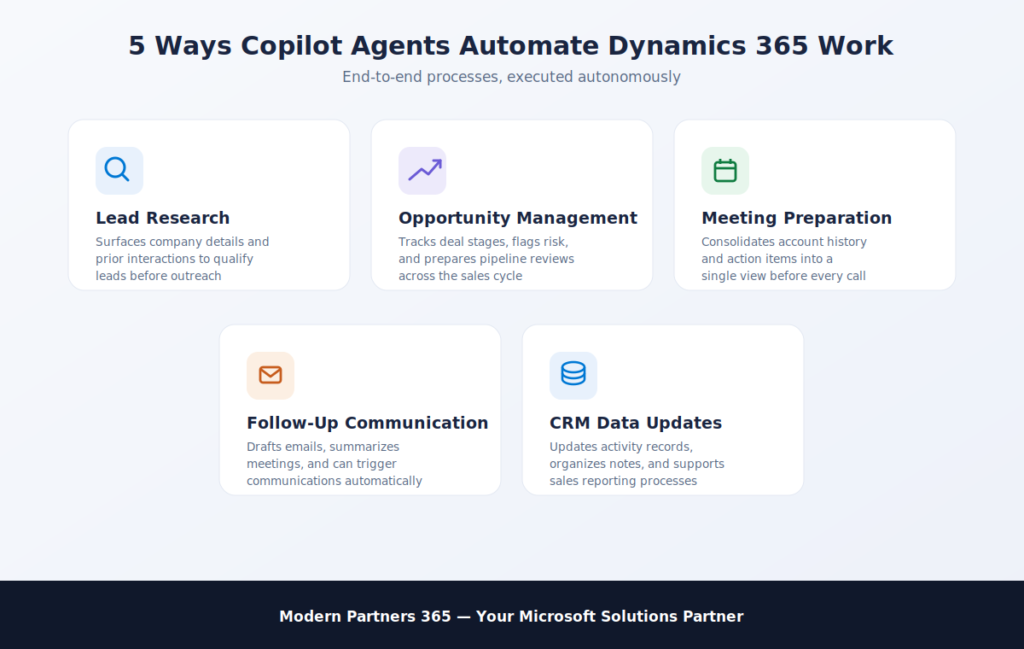
Lead Research and Qualification
Copilot Agents can help sales teams gather and organize information about potential customers before outreach begins. Instead of manually reviewing multiple records and sources, agents can automatically surface the information needed to assess lead quality.
Common activities include:
- Summarizing lead information
- Identifying key company details
- Reviewing previous interactions
- Highlighting potential opportunities
- Preparing lead qualification insights
Opportunity Management
Copilot Agents can support opportunity management by helping sales teams track, analyze, and organize information throughout the sales cycle. This allows representatives to spend more time engaging with prospects and less time managing administrative work.
Examples include:
- Summarizing opportunity records
- Identifying next steps
- Highlighting potential risks
- Organizing sales activities
- Preparing pipeline reviews
Meeting Preparation
Preparing for customer meetings often requires gathering information from multiple sources. With Dynamics 365 AI Automation Copilot Agents can automatically consolidate relevant details into a single view, reducing preparation time and ensuring important information is not overlooked.
This may include:
- Account summaries
- Open opportunities
- Recent customer interactions
- Meeting history
- Action items and follow-ups
Follow-Up Communication
Sales follow-up is critical, but it can also become repetitive. Copilot Agents can help teams create consistent and timely communications based on customer interactions and Dynamics 365 data and in some cases, trigger these communications automatically as part of a workflow.
Examples include:
- Drafting follow-up emails
- Summarizing meetings
- Creating action-item lists
- Preparing customer updates
- Organizing communication records
CRM Data Updates and Administrative Tasks
Many sales teams spend a significant portion of their day updating records and maintaining CRM data. Copilot Agents can help reduce this burden by supporting data management processes and executing workflow-driven updates autonomously.
Potential use cases include:
- Organizing customer information
- Updating activity records
- Tracking sales interactions
- Managing notes and summaries
- Supporting sales reporting processes
By utilizing Microsoft Copilot Agents, organizations can strengthen their Dynamics 365 AI Automation strategy while allowing sales teams to focus more time on building relationships and closing opportunities.
Looking to identify practical automation opportunities in Dynamics 365? Modern Partners 365 helps organizations design and implement AI-powered workflows that reduce manual work, improve productivity, and support scalable business growth. Contact Modern Partners 365 to explore how Copilot Agents and Dynamics 365 can help automate key business processes across your sales operations.
Business Considerations Before Implementing Copilot Agents in Dynamics 365 Automation?
Successful Copilot Agents implementations depend on more than AI technology alone. Organizations should establish a strong foundation of quality data, governance, and user adoption to maximize the value of business automation and avoid AI projects failure.
Is Your Dynamics 365 Data Ready for Automation?
Copilot Agents rely on the information available within connected systems. If customer records, opportunities, activities, or account information are incomplete or outdated, automation results may be less effective.
Before implementing Copilot Agents, organizations should review:
- CRM data quality
- Duplicate records
- Missing customer information
- Opportunity management processes
- Data governance policies
Accurate and well-maintained Dynamics 365 data helps ensure AI-generated insights and automated workflows are based on reliable information.
How Can Organizations Encourage User Adoption?
Even the most advanced automation solution will struggle to deliver value if employees do not engage with it consistently. Successful Dynamics 365 AI Automation requires users to understand how Copilot Agents support their daily work rather than viewing them as another technology initiative.
Best practices include:
- Starting with high-impact use cases
- Providing role-specific training
- Establishing clear usage guidelines
- Gathering employee feedback
- Measuring productivity improvements
Organizations that focus on user adoption often achieve faster returns from their Dynamics 365 AI Automation investments.
What Governance Considerations Should Businesses Address?
Because Copilot Agents can act autonomously, governance is especially important. Organizations should establish policies that define what agents are permitted to do, who can access information, and how outputs should be reviewed before actions are taken.
Key governance considerations include:
- AI usage policies
- Role-based access controls
- Approval workflows
- Human review processes
- Change management procedures
Establishing governance early helps organizations scale automation initiatives while maintaining control over business processes.
How Does Copilot Agents Help Maintain Security and Compliance?
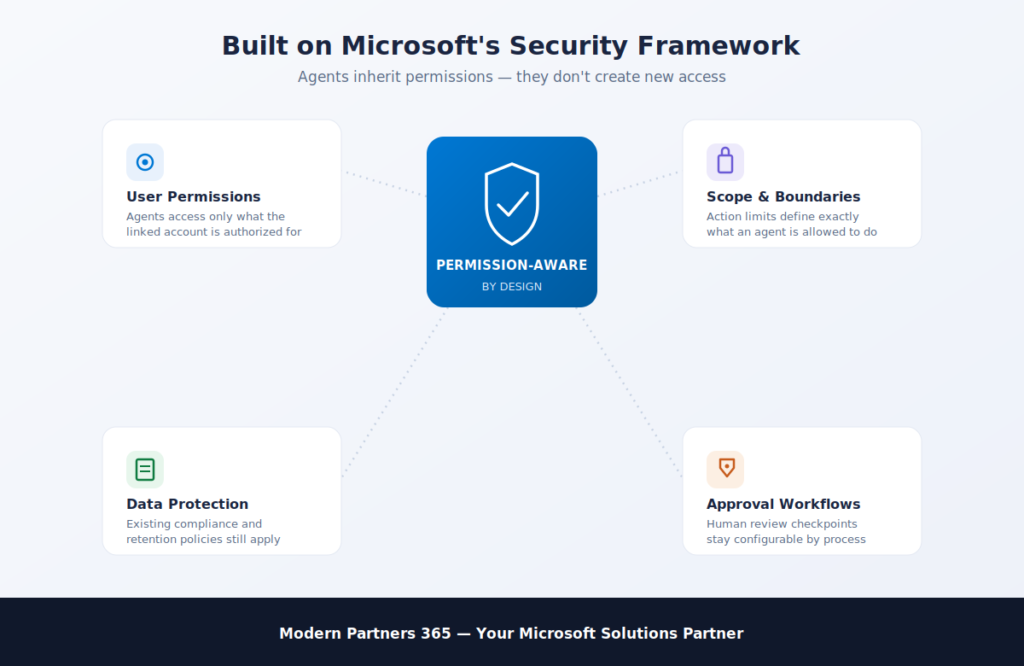
Security is a critical consideration when implementing Copilot Agents in Dynamics 365. Because agents can act autonomously with business data, customer records, and organizational knowledge, companies need confidence that information is accessed and handled appropriately and that agents only take actions they are authorized to perform.
Copilot Agents operate within Microsoft’s existing security and permission framework. This means each agent inherits the permissions of the user or service account it runs under, ensuring it can only access data and systems that have already been authorized. Organizations can also apply existing governance, compliance, and data protection policies across their Microsoft environment to control how agents behave and what they can act on.
When evaluating Copilot Agents, businesses should review:
- User permissions and access controls
- Agent scope and action boundaries
- Data protection requirements
- Industry compliance obligations
- Information retention policies
- Internal AI governance standards
By combining autonomous AI capabilities with Microsoft’s established security framework, organizations can confidently scale their automation initiatives while maintaining control over sensitive business and customer information.
Conclusion: Is Copilot Agents the Future of Dynamics 365 AI Automation?
As AI capabilities continue to evolve, businesses are looking for ways to move beyond simple assistance and automate real work autonomously. By combining CRM data, AI-powered workflows, and autonomous process execution, Copilot Agents Dynamics 365 helps organizations streamline operations and improve productivity at scale.
From lead management and opportunity tracking to meeting preparation and administrative tasks, Microsoft Copilot Agents can enable sales teams to spend less time on manual work and more time engaging with customers.
Ready to explore the potential of Dynamics 365 AI Automation? Modern Partners 365 can help you identify the right use cases and build a practical roadmap for implementing Microsoft Copilot Agents within your organization.