

Most sales teams don’t lose deals because they lack leads. They lose deals because those leads live in five different places at once, a spreadsheet here an inbox there, a sticky note on someone’s monitor. Follow-ups slip. Forecasts are guesswork. And by the time a rep finally calls a hot prospect back, someone else already closed them.
This is exactly the gap Microsoft Dynamics 365 Sales was built to close.
What is Microsoft Dynamics 365 Sales?
Microsoft Dynamics 365 Sales is a cloud-based customer relationship management (CRM) platform that helps sales teams manage leads, track opportunities, and close deals all from one connected system. It’s part of the broader Dynamics 365 Customer Engagement suite, sitting alongside applications like Dynamics 365 Customer Service and Dynamics 365 Field Service.
You’ll also see it referred to as the Microsoft Dynamics 365 Sales CRM, since CRM is really its core function it’s the engine that organizes every prospect, deal, and customer conversation your sales team has, built so nothing falls through the cracks.
In simple terms: instead of juggling separate tools for contact management, pipeline tracking, and reporting, it pulls all of it into a single workspace that’s also deeply wired into the Microsoft tools your team probably already uses every day.
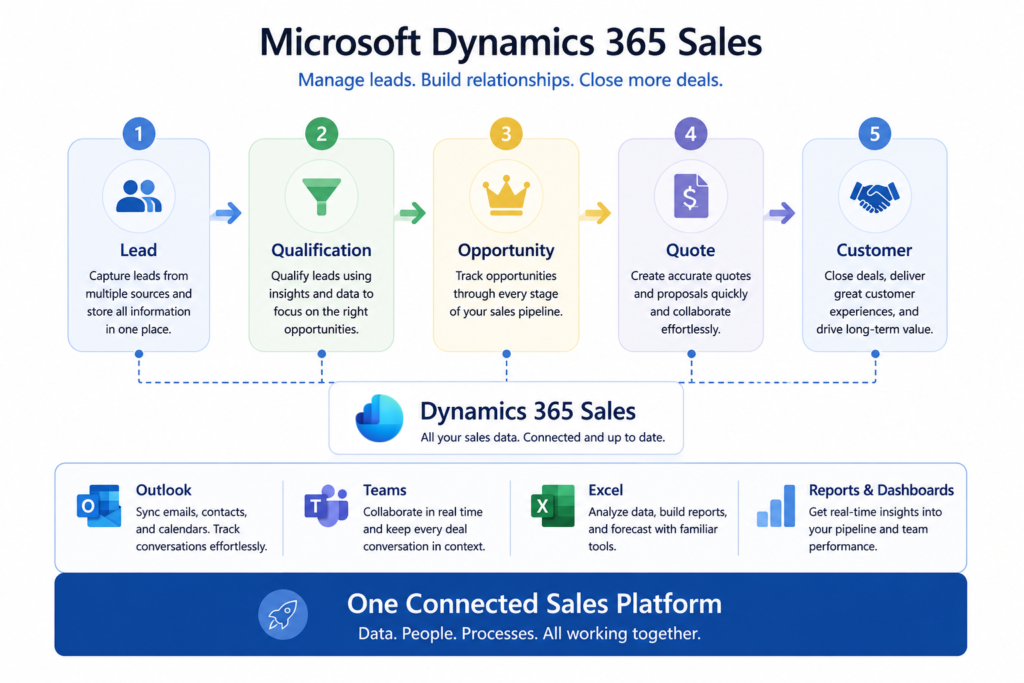
Core Capabilities: What Microsoft Dynamics 365 Sales Actually Does
At its core, Microsoft Dynamics 365 Sales handles four jobs really well.
Lead and opportunity management.
Every prospect gets a record that tracks where they came from, what they’ve engaged with, and where they sit in your pipeline.
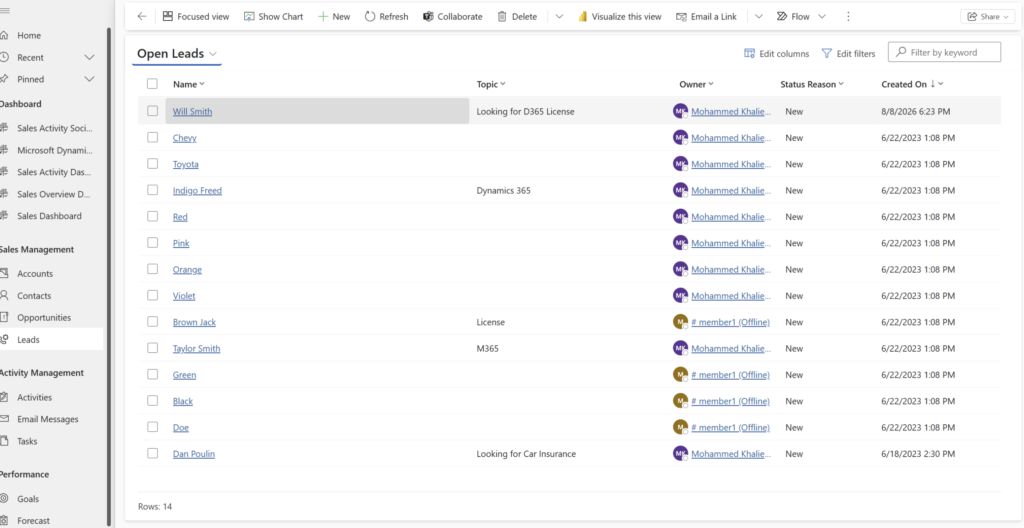
Figure 1: Dynamics 365 Sales lead view showing open leads and current status.
When a lead qualifies, it converts into an opportunity you can track all the way to close. This is also where the foundation for good Dynamics 365 sales lead qualification gets built. The cleaner your lead data, the easier it is to know who’s actually worth pursuing.
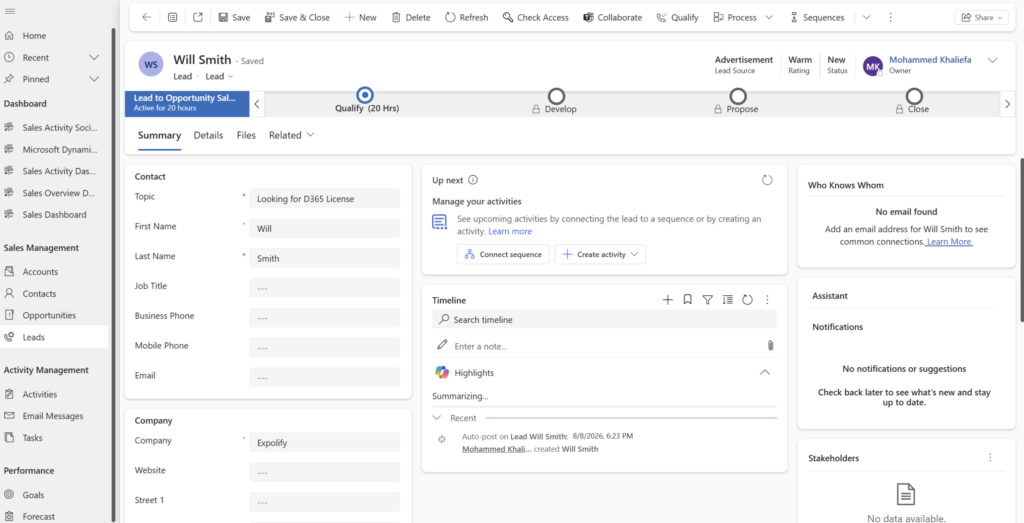
Figure 2: Lead record form capturing contact details and qualification stages.
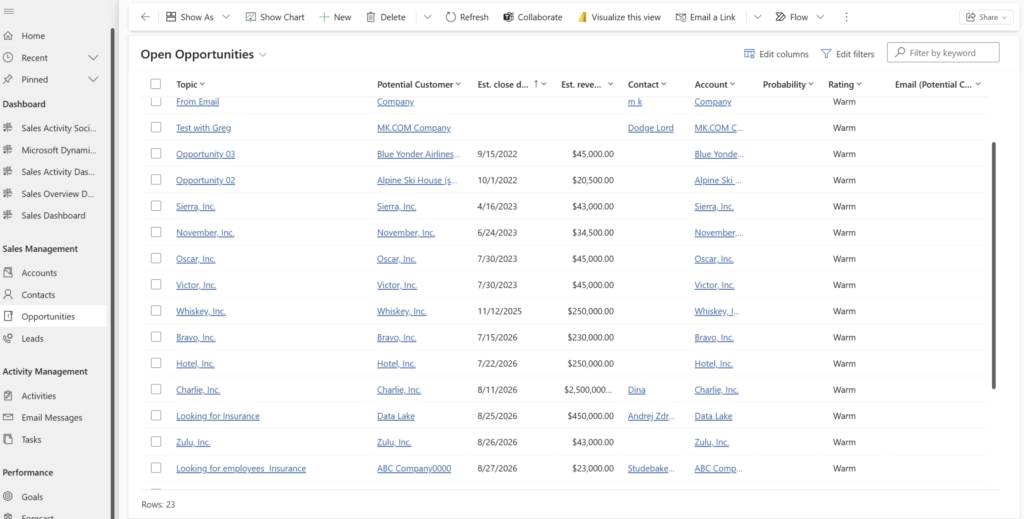
Figure 3: Active opportunities dashboard tracking pipeline value and account details.
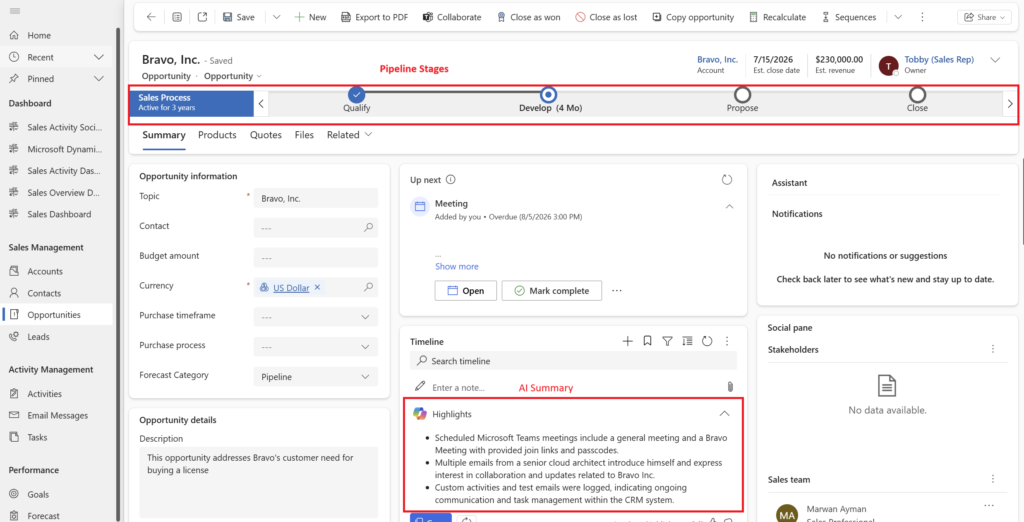
Figure 4: Individual opportunity form displaying key deal information and business process flows.
Pipeline visibility.
Dashboards and reports give managers a real-time view of what’s in motion, what’s stalling, and where reps need support without waiting for a Friday status update.
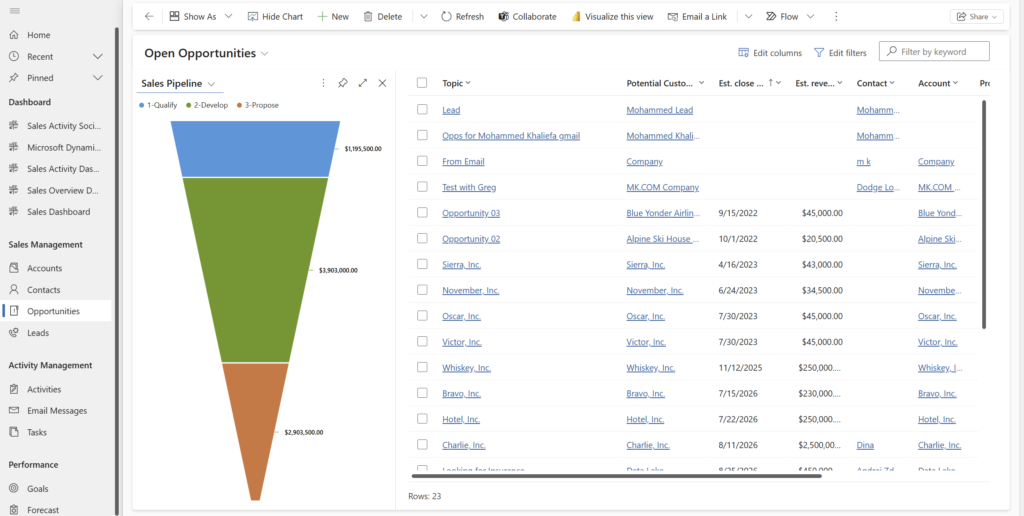
Figure 5: Visual sales pipeline funnel showing active deal stages and pipeline volume.
Forecasting.
Configurable forecasting tools let managers project revenue and track individual performance against quota, spotting pipeline risk before it becomes a missed target.
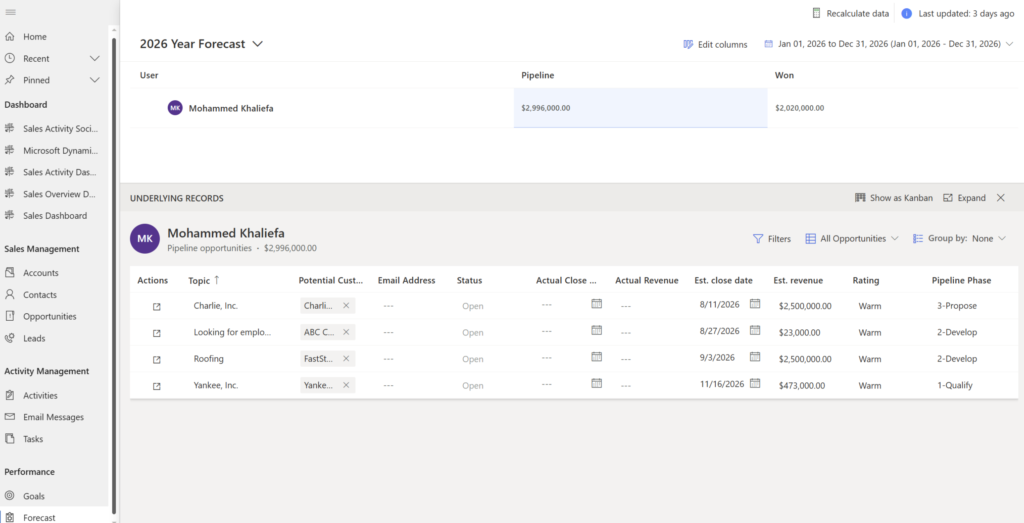
Figure 6: Built-in forecasting view tracking team quotas, projected revenue, and commitments.
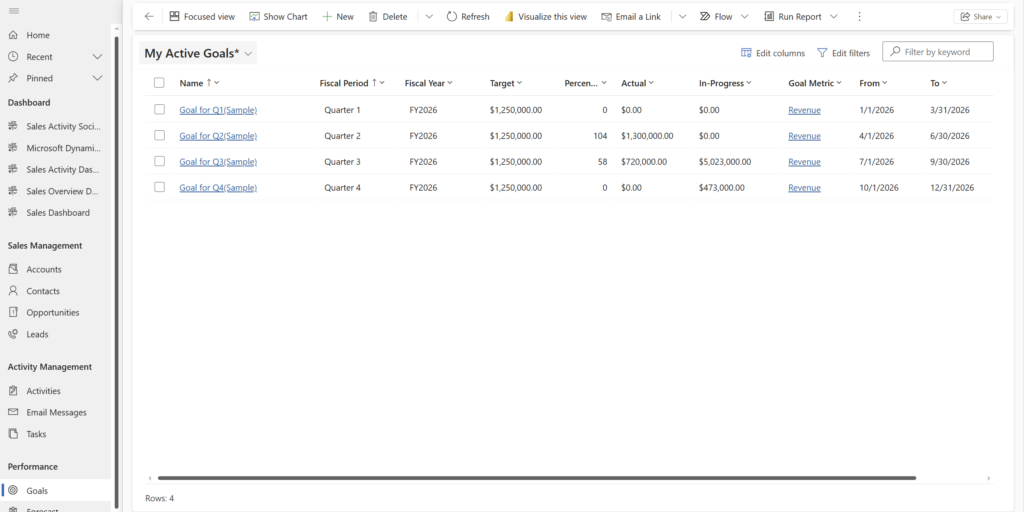
Figure 7: Goal tracking dashboard monitoring progress against key sales performance indicators.
Microsoft 365 integration.
Because Microsoft Dynamics 365 Sales is built by Microsoft, it plugs directly into Outlook, Teams, and Excel. Reps can log a call, pull a contact’s history, or update a deal without leaving their inbox.
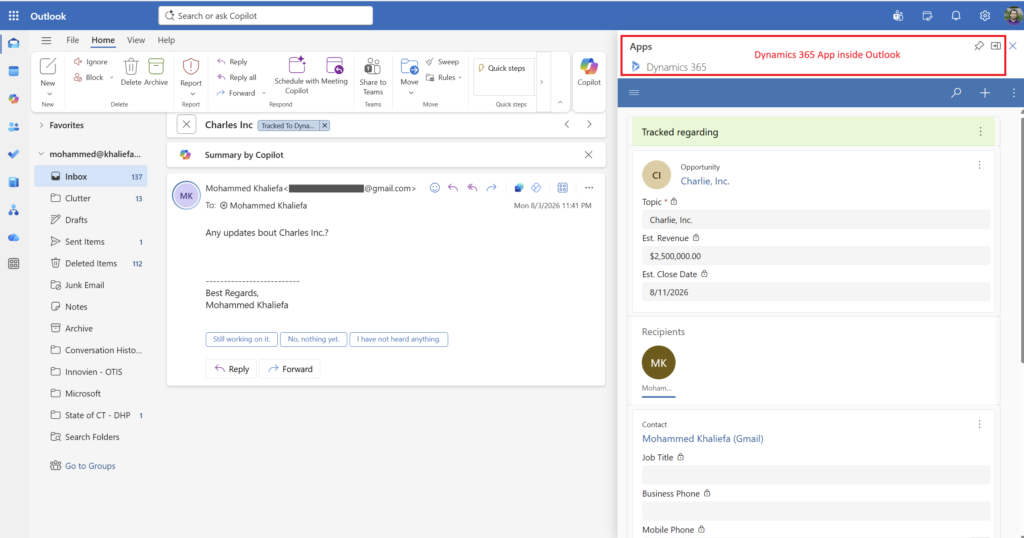
Figure 8: Dynamics 365 panel embedded directly within Outlook to log activities and sync contacts.
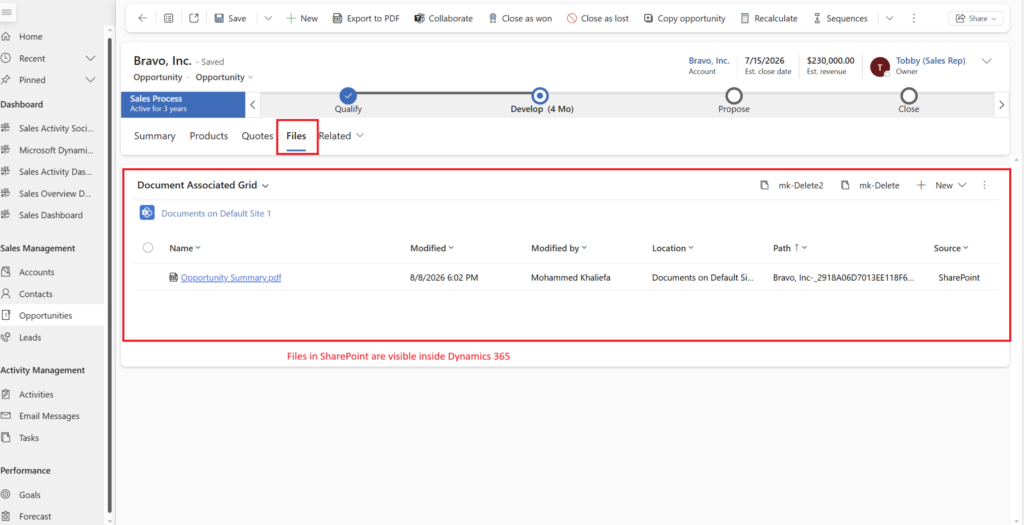
Figure 9: Integrated SharePoint document storage associated directly with sales records.
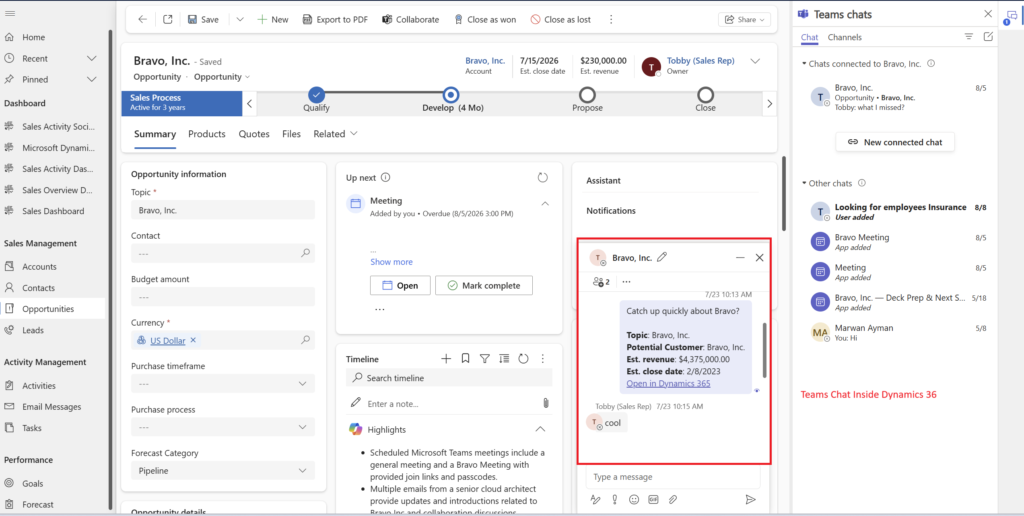
Figure 10: Microsoft Teams integration allowing direct collaboration on deal records.
A Quick Note on the Tech Underneath
If you dig into the documentation, you’ll see Microsoft Dynamics 365 Sales runs on something called Dataverse. Don’t let the name intimidate you it’s simply Microsoft’s underlying data storage layer, the “filing cabinet” that keeps all your records organized and lets different Microsoft apps talk to the same data without duplicating it.
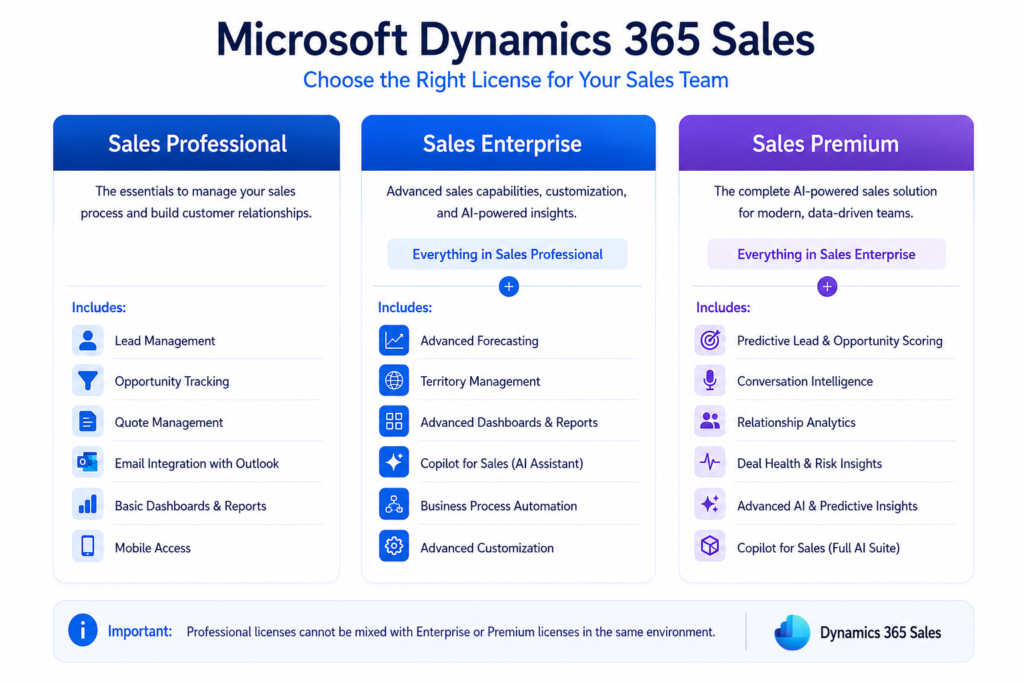
Microsoft Dynamics 365 Sales Licensing Tiers at a Glance
Microsoft Dynamics 365 Sales isn’t one-size-fits-all Microsoft offers it in tiers, so businesses can pay for the level of sophistication they actually need.
Sales Professional
The entry-level tier, built for straightforward sales processes: lead and opportunity tracking, quotes, basic dashboards. No advanced AI features.
Microsoft Dynamics 365 Sales Enterprise
Adds advanced customization, forecasting, territory management, and access to Copilot-powered features. This is the tier most mid-to-large sales teams land on.
Sales Premium
Everything in Microsoft Dynamics 365 Sales Enterprise, plus the full AI suite: predictive lead and opportunity scoring, conversation intelligence, and relationship analytics.
A quick heads-up if you’re comparing quotes: you can’t mix Professional licenses with Enterprise or Premium licenses within the same environment, so it’s worth settling on the right tier for your whole team before you commit.
Not sure which tier fits your business, or whether your current setup is even configured correctly? MP-365 helps organizations evaluate, license, and implement Microsoft Dynamics 365 Sales the right way the first time, no wasted budget on features you won’t use, no missing the ones you actually need. Contact our team for a free consultation about your sales strategy.
The Shift to Agentic CRM
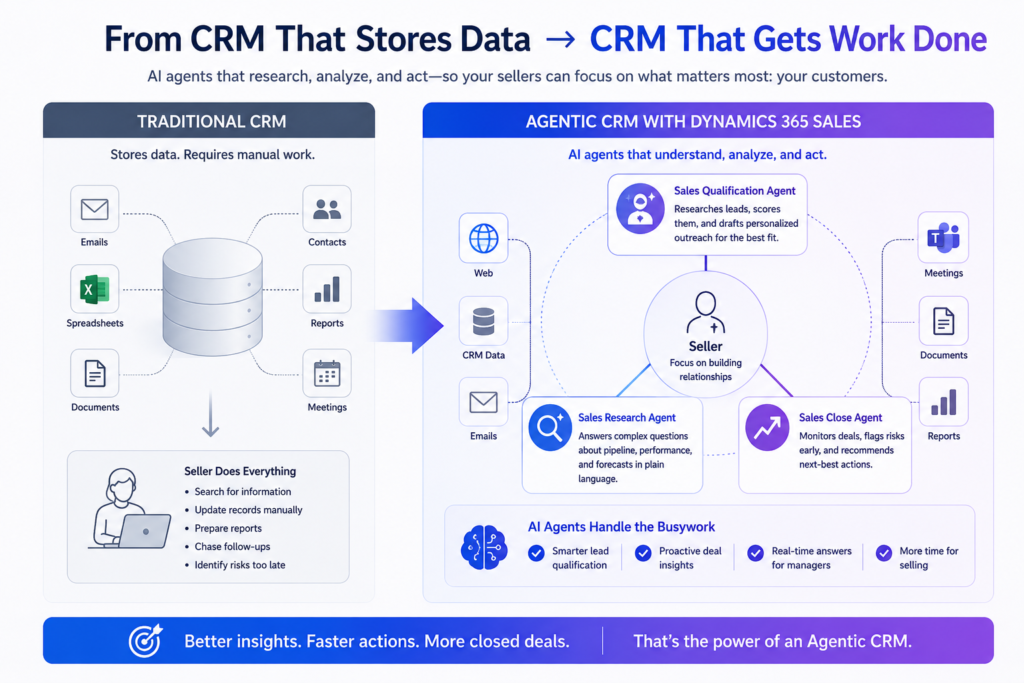
For most of its history, Microsoft Dynamics 365 sales CRM software was essentially a very organized filing system that stored data, but a human still had to do all the thinking. That’s changing fast.
Microsoft Dynamics 365 CRM is evolving into what Microsoft calls an agentic CRM, one where AI agents don’t just surface information, they actively do work on a seller’s behalf. Three agents currently anchor this shift:
- Sales Qualification Agent: researches inbound leads, scores them against your ideal customer profile, and drafts personalized outreach emails for the ones worth pursuing.
- Sales Close Agent: monitors active deals, flags risks before they sink a deal, and recommends next-best actions to keep momentum going.
- Sales Research Agent: built for sales managers, it answers complex questions about pipeline health, quota attainment, and territory performance in plain language.
In simple terms: think of these agents as a very well-trained junior analyst who never sleeps, constantly doing the research and busywork so your sellers can spend their time actually talking to customers.
What’s New in Microsoft Dynamics 365 Sales
Microsoft’s 2026 Release Wave 1 (rolling out April through September) pushes this agentic shift even further, with several concrete updates worth knowing about:
Multi-source Lead Research.
The Sales Qualification Agent previously worked mostly from Microsoft Dynamics 365 Sales CRM fields and specific websites. Now it can pull from virtually any connected data source including public web searches and custom sources through Copilot Studio to make sharper qualification decisions.
Multiple Qualification Agents Per Environment.
Larger organizations can now run several Sales Qualification Agents side by side, each configured for a specific product line, region, or team, with leads automatically routed to the right one.
Next-best-action Surfacing.
Hot, high-intent leads now show up directly in the leads grid, with a plain-language explanation of why they stand out and what topic caught their interest.
Delta Guidance for the Sales Close Agent.
This feature highlights exactly what’s changed on a deal since a rep last checked in, so nobody has to manually re-read an entire opportunity history to catch up.
Taken together, these updates mean less manual research, faster lead response times, and sales data that stays accurate without someone constantly re-entering it by hand.
Who Uses Microsoft Dynamics 365 Sales?
Microsoft Dynamics 365 Sales scales in both directions. Small and mid-sized businesses with straightforward sales cycles typically start on the Professional tier with enough structure to stop losing leads in spreadsheets, without unnecessary complexity.
Larger organizations with multi-stage sales processes, larger teams, and more complex reporting needs to generally move to Microsoft Dynamics 365 Sales Enterprise or Premium, where forecasting, AI scoring, and deeper customization become genuinely useful rather than overkill.
It shows up across a wide range of industries, professional services, manufacturing, distribution, healthcare or anywhere a sales team needs both structured process and the flexibility to adapt that process to their business.
How Dynamics 365 Sales Compares to Other CRMs
Businesses evaluating a CRM almost always end up comparing Microsoft’s offering to Salesforce, still the most recognized name in the category. The two platforms are more alike than different on the surface both offer lead and opportunity management, pipeline tracking, and AI-assisted selling.
The real differentiator is ecosystem integration. Because Microsoft builds the CRM and the productivity suite it lives alongside, Outlook, Teams, and Excel connections come built-in rather than bolted on through third-party connectors. For an organization already standardized on Microsoft 365, that means less integration work, fewer moving parts to maintain, and a shorter path from purchase to actual daily use by sales reps.
Pricing structures and customization depth vary as well, and the right choice ultimately comes down to what ecosystem your business already lives in but for Microsoft-centric organizations, that native integration is usually the deciding factor.
Conclusion: Why Does This Matter Now?
CRM platforms are in the middle of a real shift from static databases toward active, AI-driven systems that do meaningful work on a seller’s behalf. Microsoft is investing heavily in that direction with Microsoft Dynamics 365 Sales, and the gap between organizations using these AI capabilities and those still doing everything manually is only going to widen through 2026 and 2027.
Whether you’re evaluating a CRM for the first time or wondering if your current Microsoft Dynamics 365 Sales CRM setup is actually using what you’re paying for, now is a reasonable moment to take a closer look.