

Every time a new AI sales platform drops, the first question every sales manager should be asking isn’t “what does it do?” it’s “will it actually fit with the CRM, ERP, and software we’re already using?” Because a tool that doesn’t connect cleanly to your existing stack doesn’t save time. It creates more of it.
For teams on Microsoft Dynamics 365, that question matters more than most. The D365 ecosystem has its own data structure, its own integration layer, and its own native AI capabilities which means not every sales AI tool on the market is going to work the way the vendor’s demo suggests it will.
Today we’re cutting through the noise. This guide covers the sales AI tools that sales teams can realistically use alongside Dynamics 365 what genuinely integrates, what D365 already handles on its own, and what to look for before committing to anything new.
What Sales AI Tools Actually Mean for Dynamics 365 Users
Sales AI tools are not a one-size-fits-all category and inside the Dynamics 365 ecosystem, that distinction becomes even more important. Before evaluating any external platform, it helps to understand what “integration with D365” actually means in practice, because not all integrations are built the same way.
There are two types worth separating clearly:
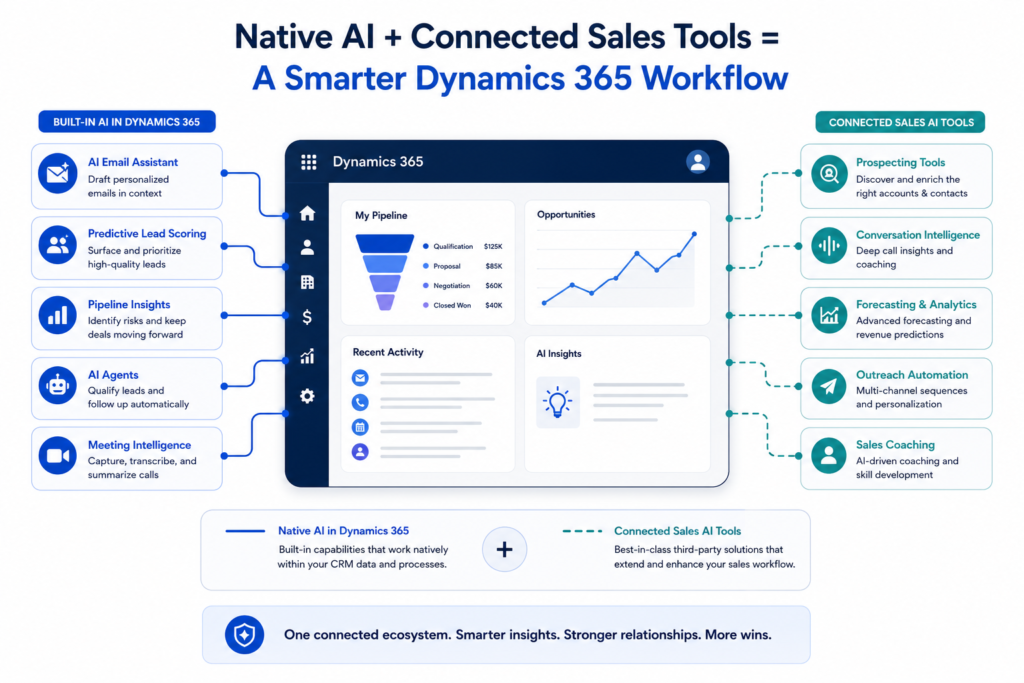
Native D365 AI Features
capabilities built directly into Dynamics 365 by Microsoft, including Copilot-assisted emails, predictive lead scoring, and AI agents. These require no third-party tool, no additional connector, and no extra data pipeline. They work because they live inside the same system.
Third-party Sales AI Tools
External platforms connect to Dynamics 365 through one of three routes:
- Microsoft AppSource listing – the safest and most vetted path
- Power Automate connector – flexible but requires setup
- Direct API integration – powerful but depends entirely on how well the vendor has built and maintained their D365 connector
This is where sales and AI start to look different for D365 users compared to teams on other CRMs:
- The integration route a tool uses determines how deeply it reads and writes your CRM data
- It also determines how much manual work sits between the AI’s output and your actual Dynamics 365 records
- A tool connected via AppSource is certified to work within the Microsoft ecosystem
- A tool connected via a generic API might sync contacts but miss opportunities, activities, or custom entities entirely
Understanding this before evaluating any tool saves a lot of time and a lot of disappointing demos.
AI Sales Automation Already Inside Dynamics 365
Before adding any external sales AI tools to your stack, it’s worth knowing what Dynamics 365 already does on its own. Several capabilities that teams are actively paying third-party vendors for are already included in their existing D365 license.
Here’s what’s built in as of 2026 Wave 1:
Copilot-Assisted Email Drafting
Dynamics 365 Copilot drafts personalized sales emails directly inside the platform, pulling context from the opportunity, account history, and recent activity. A rep can review, edit, and send without leaving the CRM.
Predictive Lead Scoring
D365 automatically scores incoming leads based on historical conversion patterns, firmographic data, and engagement signals. Reps see a prioritized list rather than a flat queue of unranked contacts.
Pipeline Insights
Copilot surfaces deal risk signals across the pipeline stalled opportunities, dropped engagement, deals sitting too long at a stage and flags them proactively in the seller’s workspace.
AI Agents for Lead Qualification and Follow-Up
Introduced in the 2026 Wave 1 updates, autonomous AI agents can handle initial lead qualification conversations, send follow-up messages, and update CRM records automatically based on prospect responses.
Meeting Intelligence
Dynamics 365 captures, transcribes, and summarizes sales calls, pulling action items and next steps directly into the relevant opportunity record without manual note-taking.
The AI sales automation already baked into Dynamics 365 covers more ground than most teams realize, especially teams that haven’t explored what their current license tier actually includes. That said, gaps remain. Deeper conversation intelligence, advanced prospecting enrichment, and cross-channel outreach personalization are areas where third-party sales AI tools still add meaningful value on top of what D365 provides natively.
Not sure which sales AI tools will actually work with your Dynamics 365 setup?
Finding tools that genuinely integrate with your existing D365 stack without duplicating what you already have or breaking your data structure is harder than most vendors make it sound. Book a free consultation with MP-365 and we’ll map the right tools to your specific setup, license tier, and sales workflow.
Book Your Free Consultation → Contact Us
The Best Sales AI Tools for Microsoft Dynamics 365 in 2026
Not every tool that claims Dynamics 365 compatibility delivers on that promise. The sales AI tools listed below have been selected specifically for the quality and depth of their D365 integration not just because they’re popular in the general market. Each one is grouped by the sales function it serves.
AI Prospecting and Sales and AI Enrichment Tools
Cognism
- What it does: Cognism is a B2B prospecting platform that provides phone-verified contact data, intent signals, and firmographic enrichment to help reps build targeted lead lists faster
- How it connects to D365: native Dynamics 365 integration via Microsoft AppSource — syncs contacts, accounts, and leads directly into D365 records with no manual export required
- Best for: mid-to-enterprise sales teams that prioritize data accuracy and GDPR compliance
- Price indicator: $$$
Kaspr
- What it does: Kaspr is a contact enrichment tool that surfaces verified phone numbers and email addresses from LinkedIn profiles and exports them directly into a CRM
- How it connects to D365: How it connects to D365: Contact data can be exported into Dynamics 365 using CRM integrations and custom workflows, but Kaspr does not currently offer the same level of native Dynamics 365 integration as enterprise platforms like Cognism.
- Best for: small to mid-size teams doing high-volume LinkedIn prospecting
- Price indicator: $
Conversation Intelligence and AI Sales Automation
Chorus.ai (by ZoomInfo)
- What it does: Chorus.ai is a conversation intelligence platform that records, transcribes, and analyzes sales calls to surface coaching opportunities, deal risks, and competitor mentions
- How it connects to D365: integrates with Dynamics 365 via API, syncing call recordings and summaries directly into opportunity and contact records
- Best for: sales organizations that want call intelligence tied directly to CRM deal data
- Price indicator: $$$
Salesloft
- What it does: Salesloft is a revenue orchestration platform that combines AI-powered call coaching, deal intelligence, and pipeline management in a single platform
- How it connects to D365: certified Dynamics 365 integration available on Microsoft AppSource bi-directional sync of contacts, opportunities, and activity data
- Best for: mid-to-large sales teams running structured, multi-touch sales motions
- Price indicator: $$$
Outreach Personalization and AI Sales Automation Tools
Lavender
- What it does: Lavender is an AI email coaching tool that analyzes outbound sales emails in real time and suggests improvements to increase reply rates before the rep hits send
- How it connects to D365: can be incorporated into Dynamics 365 workflows using Microsoft Outlook and Power Automate, although it does not provide a dedicated native Dynamics 365 integration.
- Best for: individual reps and small teams focused on improving outbound email quality
- Price indicator: $
Smartlead
- What it does: Smartlead is an AI-powered cold outreach platform that manages multi-channel sequences across email and LinkedIn with automated follow-ups and inbox rotation
- How it connects to D365: Can be connected through custom APIs, webhooks, or automation platforms such as Power Automate or Make. Organizations should expect configuration work rather than a plug-and-play Dynamics 365 integration.
- Best for: sales teams running high-volume cold outreach campaigns at scale
- Price indicator: $$
AI Sales Forecasting Tools
Clari
- What it does: Clari is a revenue operations platform built around AI-driven forecasting and pipeline governance, giving revenue leaders a real-time view of whether the team will hit its number
- How it connects to D365: native Dynamics 365 integration via Microsoft AppSource pulls live pipeline data directly from D365 opportunities to power its forecasting models
- Best for: revenue leaders and sales ops teams where forecast accuracy is a board-level priority
- Price indicator: $$$
Sales Coaching and Enablement
Showpad
- What it does: Showpad is a sales enablement platform that uses AI to recommend the right content, training, and coaching to reps based on the deal stage and buyer profile they’re working with
- How it connects to D365: certified integration with Dynamics 365 via Microsoft AppSource surfaces relevant content recommendations directly inside D365 opportunity records
- Best for: sales organizations with a formal enablement function and a library of sales content to manage
- Price indicator: $$
Spekit
- What it does: Spekit is an AI-powered just-in-time learning platform that delivers training content, process guidance, and product knowledge to reps directly inside the tools they’re already using
- How it connects to D365: native Dynamics 365 integration surfaces contextual guidance and training cards inside D365 without requiring reps to leave the CRM
- Best for: teams onboarding new reps quickly or rolling out process changes that need in-context guidance
- Price indicator: $$
How AI Sales Automation Changes the Day-to-Day for D365 Sales Teams
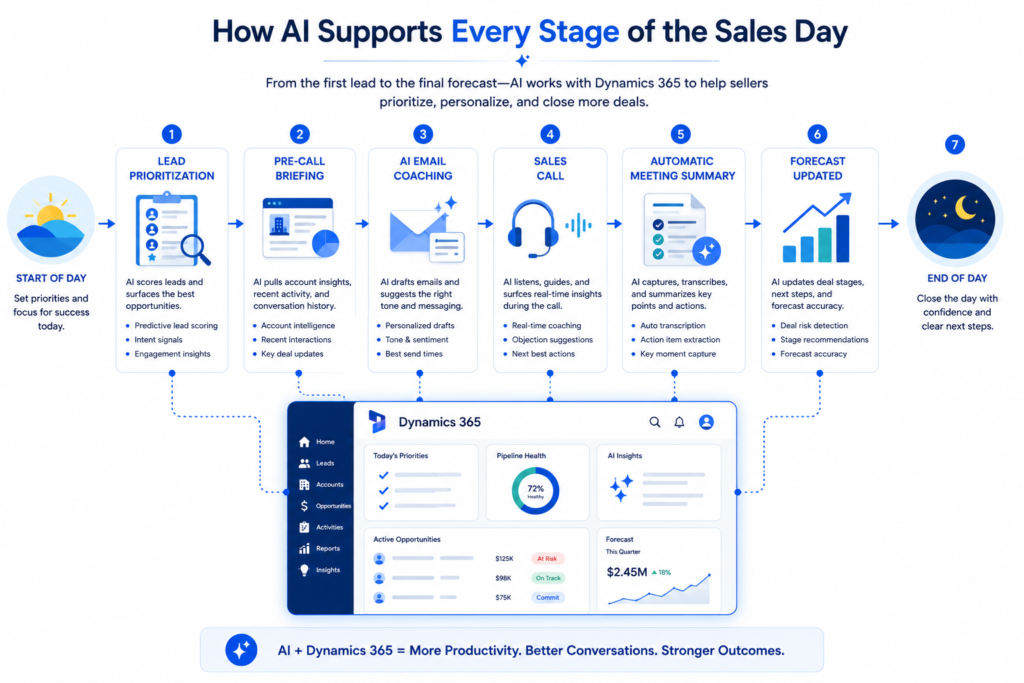
Here’s what a connected AI sales stack actually looks like inside Dynamics 365 not in theory, but in a real rep’s working day
Start of Day
A rep opens Dynamics 365 and instead of a flat list of tasks, they see a prioritized workspace. Predictive lead scoring has already ranked incoming leads overnight. Pipeline Insights has flagged two deals that haven’t had activity in over a week, with a suggested next action for each. The rep knows exactly where to start without a manager telling them.
Before a Prospect Call
Copilot surfaces a pre-call briefing pulled from the opportunity record, recent emails, and account activity. The rep walks into the conversation with full context on where the deal stands, what was discussed last time, and what objections came up previously without spending 20 minutes digging through notes.
During Outreach
Instead of writing cold emails from scratch, Lavender analyzes the draft in real time and flags what’s likely to reduce reply rates. Smartlead manages the follow-up sequence automatically, adjusting send times and rotating inboxes to protect deliverability. The rep focuses on responses, not logistics.
After a Call
Meeting intelligence transcribes the conversation and pushes a summary, action items, and next steps directly into the opportunity record in D365. Chorus.ai flags a competitor mention that came up mid-call and adds it to the deal’s risk profile. Nothing gets lost in a notebook or a rep’s memory.
End of Day
Clari has updated the forecast automatically based on the day’s activity across the team’s pipeline. The sales manager reviews a live view of which deals moved, which stalled, and where the number stands without chasing reps for updates.
The cumulative effect of AI sales automation running across these touchpoints isn’t just time saved. It’s a fundamentally different relationship between sales and AI, one where the system is actively working alongside the rep rather than waiting to be updated. At the team level, forecast accuracy improves, coaching becomes more targeted, and the gap between top performers and average reps starts to narrow because the AI is surfacing the same quality of insight for everyone.
What to Check Before Adding Sales AI Tools to Your D365 Stack
Not every tool that works well in isolation works well inside a Dynamics 365 environment. Before committing to any external platform, run it through these four checks first.
AppSource Availability
- Check whether the tool has an active listing on Microsoft AppSource before anything else
- An AppSource listing means the tool has been reviewed and certified by Microsoft to work within the Dynamics 365 ecosystem it’s the strongest signal of genuine compatibility
- Tools that only offer a generic API connection or a Zapier workaround as their “D365 integration” should be treated with caution until you’ve seen a live demo inside an actual D365 environment
Dataverse Compatibility
- Ask specifically whether the tool reads and writes to Dataverse the underlying data platform that powers Dynamics 365 or whether it only connects at the surface level
- A tool that syncs contacts but can’t read custom entities, opportunity fields, or activity records isn’t truly integrated with D365; it’s just moving data between two disconnected systems
- Dataverse compatibility determines whether the AI’s output actually shows up where reps work, inside D365 records, or sits in a separate dashboard nobody checks
Licensing Overlap
- Before purchasing any external sales AI tool, map its feature set against what’s already included in the team’s existing Dynamics 365 and Microsoft 365 license tier
- Teams on Dynamics 365 Sales Premium, for example, already have access to predictive lead scoring, Sales Insights, and Copilot-assisted features paying separately for a tool that duplicates those is a common and avoidable mistake
- AI sales automation capabilities in particular tend to overlap heavily with what higher D365 license tiers already provide
Data Governance Within the Microsoft Ecosystem
- Any sales AI tool connecting to Dynamics 365 will touch data that lives inside the Microsoft ecosystem which means data residency, retention policies, and model training practices all need to be checked against the organization’s existing Microsoft compliance posture
- Ask the vendor explicitly: is customer data used to train models shared across other customers? Where is data stored, and does that align with regional compliance requirements like GDPR?
- Tools certified on AppSource have already passed a baseline Microsoft security review, but that doesn’t replace a vendor-specific data governance conversation before signing a contract
Conclusion: Choosing the Right Sales AI Tools for Your Dynamics 365 Stack
The right Sales AI tools for a D365 team aren’t necessarily the ones with the most features or the highest ratings on a generic review site. They’re the ones that connect cleanly to your existing stack, add something Dynamics 365 doesn’t already do natively, and fit the way your sales team actually works day to day.
Where Sales and AI come together most effectively inside Dynamics 365 is when the integration is deep enough that reps don’t have to think about it the right information surfaces at the right moment, inside the CRM they’re already in, without a separate login or a manual sync.
If you’re earlier in the evaluation process and want a broader view of the AI sales tools landscape before narrowing down to D365-specific options, our complete guide to AI sales tools for B2B teams covers every major category, tool comparison, and evaluation framework in detail.
And if you’re ready to map specific tools to your actual Dynamics 365 setup, license tier, and sales workflow, Modern Partners 365 offers a free consultation to walk through exactly that no generic recommendations, just a clear picture of what makes sense for your specific environment.