

The System That Never Got a Chance
A mid-sized sales team flips on predictive lead scoring inside Dynamics 365 Sales, expecting it to start ranking their leads by the end of the week.
Nothing happens. The “Get started” button stays greyed out. When someone finally digs into why, the answer is almost anticlimactic: the organization simply doesn’t have enough closed leads on record for the system to learn from. Months later, after quietly accumulating more data, they try again and this time it works, but the scores it hands back are inconsistent and confusing, because half the sales team had been qualifying and disqualifying leads by completely different personal standards.
The AI didn’t fail here. The setup did, twice in two different ways. That’s really the whole story of AI-driven qualification in Dynamics 365 Sales: the sophistication of the tool matters far less than the quality of the foundation underneath it.
Part 1: Getting the Setup Right Before the AI Ever Touches a Lead
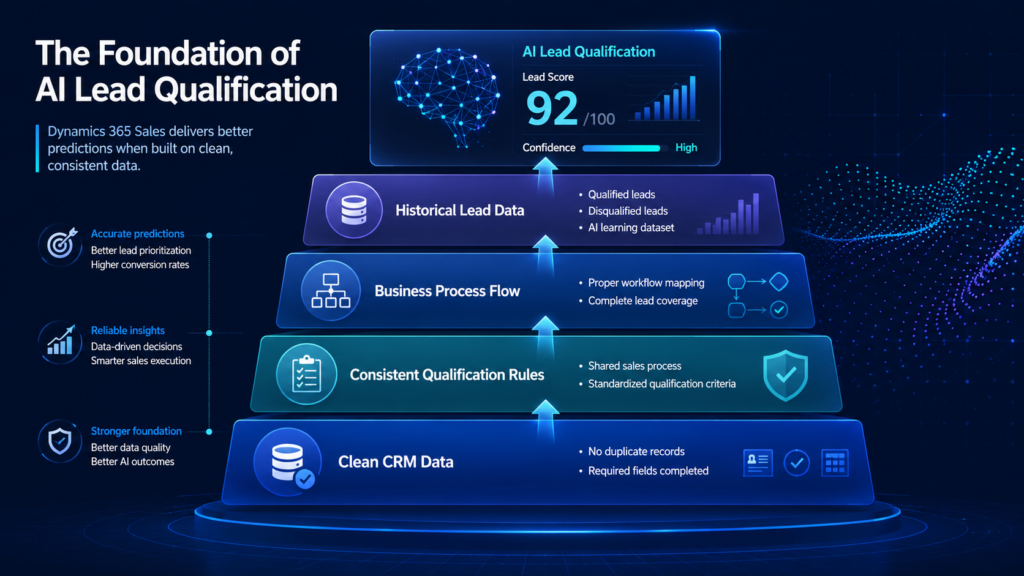
Before D365 Sales can qualify anything on its own, it needs specific ingredients in place. This isn’t a sales-skills topic, it’s a data and configuration one, and skipping it is the single most common reason these features underdeliver.
The 40-and-40 Rule
Microsoft’s predictive lead scoring model has a hard, non-negotiable requirement: an organization needs a minimum of 40 qualified and 40 disqualified leads created and closed within the training period you select. Below that threshold, the system won’t even let you build a scoring model, the option simply stays disabled.
This trips up newer Dynamics 365 Sales deployments constantly. A company that only started using the CRM eight months ago, or one that’s historically tracked leads loosely in spreadsheets before migrating, often doesn’t have the volume of clean, closed-out lead records this requires yet.
The Right License and Settings Enabled
Predictive lead scoring isn’t available on every tier. It requires Dynamics 365 Sales Enterprise or Premium, with Advanced Sales Insights features turned on, Sales Professional doesn’t include this capability at all. Someone also needs System Administrator access for Dynamics 365 Sales to configure it in the first place.
Clean, Consistent Lead Data
This is the quieter, more common failure point. The model learns from how leads were qualified and disqualified in the past so if:
- Duplicate lead records are inflating or skewing the dataset
- Key fields are frequently left blank or filled in inconsistently
- Different reps use different personal criteria for marking a lead “qualified”
…the model ends up learning from noise, not signal. It will still generate scores. They just won’t mean much.
Mapping the Right Business Process Flow
Leads that fall outside the business process flow selected for a scoring model don’t count toward training or scoring at all. If a team runs multiple sales processes for different product lines or regions, this mapping has to be deliberate otherwise leads quietly fall outside the model’s view entirely.
Part 2: How to Actually Fix Each of These Issues in D365 Sales
Knowing what’s wrong doesn’t help much without knowing what to do about it. Here’s the practical fix for each requirement above, in the same order.
If You’re Short on the 40-and-40 Minimum
- Check your current count first: D365 Sales Insights settings shows exactly how many qualified and disqualified leads you have in the training window you select, so this isn’t a guessing game
- If you’re close but not quite there, extend the training period, the window can go back as far as two years, so widening it often clears the threshold without waiting months for new data
- If you’re migrating from another CRM or coming from spreadsheets, import historical closed-lead records (qualified and disqualified both) into Dynamics 365 Sales rather than starting the count from zero on day one
If D365 Sales Licensing Is the Blocker
- Confirm your current tier first: this is usually a quick check with whoever manages your Microsoft licensing internally, or with your implementation partner
- If you’re on Sales Professional, upgrading to Dynamics 365 Sales Enterprise (or Premium, if you also want conversation intelligence and relationship analytics) is what unlocks predictive scoring, this is a licensing change, not a technical migration, so it’s usually faster to execute than people expect
- Make sure Advanced Sales Insights features are actually toggled on after the upgrade, the license alone doesn’t activate it automatically
If Your Lead Data Is the Problem
- Run a deduplication pass before building any model: duplicate records are one of the fastest ways to quietly corrupt a scoring model’s training data
- Get the sales team aligned on one shared definition of “qualified” versus “disqualified” before more data gets logged, this is a five-minute conversation that prevents months of inconsistent training data
- Use required fields or business rules going forward so key data points can’t be left blank or entered inconsistently, this protects data quality on an ongoing basis, not just as a one-time cleanup
If Business Process Flow Mapping Is Off
- Check which leads have abandoned or fallen outside your selected business process flow, these leads silently don’t count toward training or scoring, so this is worth auditing directly rather than assuming it’s fine
- If multiple teams or regions are running different flows without a clear reason, consider consolidating them, or building separate scoring models mapped intentionally to each flow
Part 3: What Happens Once Dynamics 365 Sales Starts Qualifying Leads Itself
Once that foundation is actually in place, here’s the direct payoff.
Every New Lead Gets Scored Automatically
Dynamics 365 Sales assigns each lead a score from 0 to 100, based on patterns the model found in the organization’s own historical data, not a generic industry benchmark, but this specific company’s actual won and lost history.
The Model Keeps Learning
This isn’t a static rule set someone configures once and forgets. As more leads get closed out, qualified, or disqualified, Dynamics 365 Sales continues adjusting, which is exactly why the quality of ongoing data entry matters just as much as the initial setup.
Reps Get a Ranked Queue, Not a Flat List
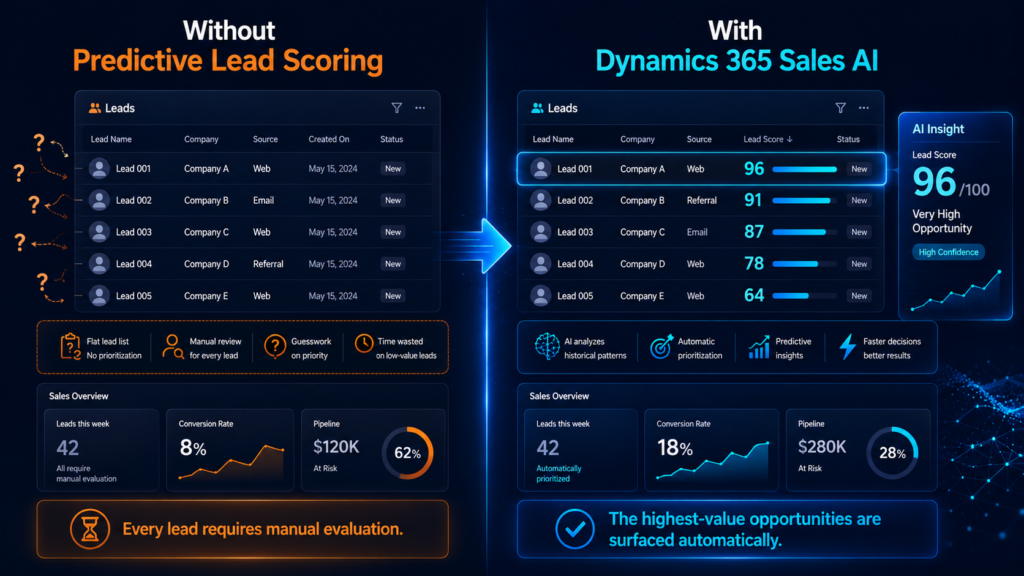
Picture a rep opening a list of forty new leads on a Monday morning. Without scoring, they’re guessing which ones to call first. With an accurate model in place, the highest-probability leads are already surfaced at the top, a real head start, not a guarantee, but a far better one than a blank list.
Part 4: Why the First Step Decides Everything That Follows
This is where the cause-and-effect really shows up, and it runs in two very different directions depending on what happened in Parts 1 and 2.
If the Setup Was Wrong
- The model may never activate at all, stuck behind the 40/40 minimum
- If it does activate on messy or inconsistent data, it produces unreliable scores
- Reps quickly notice the scores don’t match reality, stop trusting them, and go back to guessing manually
- The Enterprise or Premium D365 Sales license spend on this feature effectively goes to waste, since nobody’s actually using what it produces
If the D365 Sales Setup Was Right
- Scores are meaningful from the point the model activates, and grow more accurate as more data comes in
- Reps spend their limited time on the leads statistically worth pursuing, instead of working a flat list in the order it arrived
- Sales managers get a pipeline view that reflects what’s actually happening, not one distorted by inconsistent manual tagging
The pattern worth remembering: when Dynamics 365 Sales AI-driven qualification “doesn’t work” for a company, the AI is almost never the actual problem. The setup that came before it usually is.
Getting the Foundation Right, Not Just the Feature Turned On
Turning on predictive lead scoring is a five-minute setting. Getting it to actually produce trustworthy results is a data and process problem, auditing lead data quality, making sure qualify/disqualify criteria are consistent across the team, and confirming the business process flow mapping is correct before anyone flips the switch.
This is the kind of groundwork MP-365 works through with sales organizations directly, not just enabling automation features inside Dynamics 365 Sales, but making sure the underlying setup can actually support them first. Visit MP-365 to talk through whether your current setup is ready for it.
Conclusion: The First Step Decides the Rest
Go back to that sales team from the opening, the one staring at a greyed-out button, and later, at scores nobody trusted. None of that was really about the AI being immature or unreliable. It was about a foundation that hadn’t been prepared before the switch got flipped.
Dynamics 365 Sales can genuinely qualify leads on its own, but only as well as the data and setup it’s standing on. Get that first step right, and everything the system does afterward actually earns its keep.